
Click here to see the list of release notes
Includes: Kaltura Player (V7), Player Plugins, Player Studio
Date: October 18, 2026
What’s new
Improved contrast for player controls
The Kaltura Player now displays semi-transparent dark backgrounds, or “pills,” behind its buttons. These backgrounds improve contrast between the controls and video content, including bright scenes and presentation slides. No setup or custom styling is required.
- WCAG 2.1 contrast compliance: The backgrounds help controls meet the 3:1 minimum contrast ratio without custom CSS, supporting accessibility requirements such as ADA Title II and Section 508.
- Hover and focus styling: Hover shadows and keyboard focus outlines appear over the contrast backgrounds, keeping focus indicators visible during keyboard and screen reader navigation.

Customize player plugins with CSS
Player plugins now include stable CSS class names and named CSS custom properties. Designers and developers can use them to customize plugin appearance and keep custom branding consistent across player updates.
Here are some of the options available for each plugin:
- Interactive Video Quiz (
playkit-ivq): Customize font sizes, line heights, button corner radii, and popup blur backgrounds. For example, use--ivq-question-font-size,--ivq-answer-border-radius, and--ivq-popup-background. - Interactive Transcript (
playkit-transcript): Customize caption typography, timestamp size, panel padding, and background opacity. For example, use--transcript-caption-font-sizeand--transcript-panel-background. - Chapter Navigation (
playkit-navigation): Customize chapter titles, thumbnail card dimensions, timestamps, and panel backgrounds. For example, use--navigation-item-title-font-sizeand--navigation-panel-blur. - Live Q&A (
playkit-qna): Customize chat messages, author labels, and input fields. Input fields adjust their minimum height for larger font sizes to prevent text clipping.
For more information, see:
Connect video activity to PathFactory
The Kaltura KAVA analytics plugin now lets you add optional PathFactory IDs (pfPageViewId and pfSessionId) to the player configuration. These IDs link video activity to the matching PathFactory visitor session.
- Match video starts, pauses, seeks, and viewing progress at 25%, 50%, 75%, and 100% with the PathFactory session. You can use this combined data in Databricks and marketing automation tools.
- The IDs are optional. Kaltura analytics continues to work as usual if you leave them out.
Use admin tags in custom media integrations
The player now includes admin tags (adminTags) when it sends media details to custom integrations.
Integrations such as Individeo can use the tags to identify and route specific media. Because admins manage the tags, end users can't change or overwrite them in the portal.
Resolved issues
| ID # | Description |
|---|---|
| FEC-15128 | The right control buttons and partner logo are no longer clipped under open side panels (Transcript or Navigation) on viewports between 290px and 330px. |
| FEC-15130 | The vertical volume slider is now centered directly above the volume button. |
| FEC-15133 | The top bar background pill is no longer displayed on tiny player embeds (<300px width) where top controls are hidden. |
| FEC-15137 | Bottom bar buttons are now centered inside their background pills on MediaSpace instances when custom theming is disabled. |
| SUP-53676 | In Interactive Video Quiz, the explanation toggle button on the Results Review screen now displays correct labels: "Show reason" when collapsed and "Hide reason" when expanded. |
| SUP-53622 | In-player transcript search now reliably indexes and returns consistent search results across all matching terms, resolving intermittent "No Results Found" responses. |
| SUP-53241 | The Share plugin panel now displays fully without bottom clipping on MediaSpace channels configured with header media. |
| SUP-53632 | The Picture-in-Picture (PiP) button now remains in the bottom control bar and functions properly after navigating away and returning to the player page. |
| SECF-30914 | Recursive object merging and cloning utilities now protect against prototype pollution vulnerabilities during configuration parsing. |
| SECF-30916 | Enforced HTTP/HTTPS URL scheme validation on watermark and logo links to prevent arbitrary script execution upon user click. |
| SECF-30927 | Hardened session token hygiene across client-side URLs and ensured video titles rendered into iframe titles are sanitized as plain text. |
Resolved accessibility issues
| ID # | Description |
|---|---|
| ADA-3405 | In the Audio Player, the Play button is now prioritized as the first element in keyboard and screen reader (JAWS/NVDA) navigation order. |
| FEC-15080 | The Audio Player keyboard tab order has been overhauled (Right controls → Seekbar) with clean exit after the seekbar. A "Skip seekbar" button now appears conditionally when timeline items are present. |
| FEC-15101 | In the Audio Player, the interactive Live/DVR tag has been moved to the right side of the control bar, anchoring as the final tab stop. |
| FEC-15056 | Thumbnail embed containers now carry role="region" with the actual video title (e.g., "Video Title video player, region") and provide accessible play button tooltips (WCAG 4.1.2). |
| ADA-3505 | The Downloads dialog now has an accessible name (aria-label="Downloads" and aria-labelledby) for screen readers (WCAG 4.1.2). |
| ADA-3504 | The upper-bar "More" menu now programmatically connects to its dropdown container via aria-controls, provides an accessible name for the menu, and exposes aria-disabled="true" on disabled items. |
| ADA-3517 | Removed a positive tabindex attribute from the Transcript Auto Scroll button, restoring natural keyboard navigation order (WCAG 2.4.3). |
| ADA-3268 | Closing the Advanced Captions Settings modal via the close button now properly restores keyboard focus to the initiating "Set custom caption" trigger button. |
| ADA-3490 | Ensured clear four-sided visible focus outlines on the bottom list item in the Video Quality dropdown menu. |
| ADA-3491 | The "More Transcript options" button is now correctly announced by screen readers as a "Menu button" rather than a standard button. |
| ADA-3476 | Added the missing "More" hover tooltip to the upper-bar overflow button. |
| ADA-3479 | Added missing Volume Up / Down tooltips to the Audio Player volume control button. |
Includes: Kaltura Player (V7), Player Plugins, Player Studio
Date: September 6, 2026
What’s new
Customize Summary & chapters in Player Studio
Previously, Player Studio offered only an on/off toggle for Summary & chapters. Admins can now customize how the Summary & chapters panel appears and behaves for viewers directly in Player Studio, without editing player configuration files.
- Side panel position - Admins can position the panel to the left or right of the player and decide whether the panel is displayed alongside or over the video.
- Expand on first play - Admins can control whether the panel opens automatically on initial playback or remains collapsed until manually opened.

All options are available in the Summary & chapters section under Navigation & Discovery in Player Studio and apply to the video player only.
Note: New players will have the Summary and chapters customization plugin natively. Existing players will continue to work for viewers without any action needed, but the Summary & chapters toggle will appear disabled in Player Studio. Re-enabling the toggle will automatically grant access to the customization plugin without further action required.
To learn more, see our Knowledge Center article.
Resolved accessibility issues
| ID # | Description |
|---|---|
| FEC-15048 |
The Kaltura Player now supports K as a keyboard shortcut for play/pause, in addition to the existing Space shortcut. This matches the behavior of YouTube and Vimeo, reducing friction for keyboard users who are already accustomed to that shortcut. The shortcut is only active when the player has focus and works across VOD, live with DVR, and ad playback. |
| ADA-3372 |
Fixed an accessibility issue where the player error overlay used conflicting ARIA attributes, which caused violations in accessibility auditing tools and created ambiguity for assistive technologies. |
| ADA-3480 |
Fixed an issue where the Settings dialog close button was announced as "close button" instead of "Settings Dialog Close button." |
| ADA-3482 | Fixed an issue where pressing Escape to close the Settings panel moved keyboard focus to the Play button instead of returning it to the Settings button. |
| ADA-3481 | Fixed an issue where the keyboard focus indicator was not fully visible on items in the More menu, and was misaligned with the Transcript panel search field. |
Includes: Kaltura Player (V7), Player Plugins, Player Studio
Date: August 16, 2026
What’s new
Adjust EAD narration speed
Viewers can now adjust the narration speed in the Extended Audio Description (EAD) plugin. Use Speed up or Slow down to adjust the text-to-speech (TTS) narration to your preferred listening speed.

A short grace period after narration ends keeps the Replay button available for keyboard and screen reader users, meeting WCAG 2.1 AA requirements.
To learn more, see Extended audio description (EAD) player plugin.
Resolved issues
| ID # | Description |
|---|---|
| SUP-52923 | The Standard Audio Description track is now correctly identified and selectable from the player menu. |
| SUP-52915 | The AirPlay button now appears correctly on initial page load in Safari when AirPlay devices are available on the network. |
| FEC-15069 | The stream type is now reported accurately from the start of playback when live seamless failover is enabled. |
Resolved accessibility issues
| ID # | Description |
|---|---|
| FEC-15026 | The Extended Audio Description (EAD) overlay now includes speed control buttons, allowing users to adjust narration speed in 0.25× increments. The preference is saved across sessions, and speed changes are announced to screen readers. |
| ADA-3472 | Android TalkBack users can now reach the play button with fewer swipes on players with ads (IMA) or live streams enabled. |
| ADA-3425 | The transcript pop-out close button now has a clear accessible label, allowing screen readers to announce it meaningfully. |
| ADA-3406 | The volume button now provides accurate, device-independent assistive text that correctly describes how to access the volume control via keyboard. |
| ADA-3041 | The HD quality badge in the player settings menu now has a proper text alternative, making it identifiable by screen readers. |
| ADA-3484 | Keyboard users can now navigate freely when a player error overlay is displayed. |
| ADA-2775 | Keyboard focus now moves automatically to the navigation panel when a Hotspot button is activated, allowing screen reader users to interact with it immediately. |
Includes: Kaltura Player (V7), Player Plugins, Player Studio
Date: May 26, 2026
What’s new
Thumbnail embed for playlist player
Playlists can now be embedded using Thumbnail embed. With this embed option, the player loads only when playback begins, helping reduce initial page load time when multiple playlists are embedded on the same page.
To learn more, see Share and embed playlists in Rich Media CMS.
Smarter SEO metadata for accessible content
The SEO plugin now prioritizes Extended Audio Description (EAD) files when generating JSON-LD metadata for videos with multiple caption files.Metadata selection has also been improved to better represent available accessibility assets across multiple languages, helping make accessible content more discoverable in search engines.
What's improved:
- EAD files always get priority — Extended Audio Description files are now guaranteed a place in the JSON-LD output, regardless of how many other caption files are present.
- Improved language coverage — Metadata selection now considers available accessibility assets across languages rather than applying a single combined caption limit, helping improve representation across supported languages.
- Support for both captions and EAD per language — When both standard captions and EAD files are available for a language, both are included in the metadata.
Why it matters
Accessible content, particularly content with Extended Audio Descriptions, is now more reliably surfaced in search engine metadata, helping improve discoverability and strengthen accessibility support in search results.
To learn more, see Integration settings in player.
Per-entry bumper videos
Player Studio now supports configuring a different bumper video for individual entries, rather than showing the same bumper across all content in a player.
When enabled, the player reads bumper settings directly from entry metadata, allowing each entry to define its own bumper video, click-through URL, and playback position.
Prerequisites: Create a custom metadata schema with the required bumper fields.
In Player Studio: Under the Bumper settings, enable Metadata based bumper video and provide the ID of your custom schema.
To learn more, see:
Per-entry banners
Similarly, the Banner plugin now supports per-entry banner messages driven by custom metadata. Instead of displaying the same banner across all videos in a player, each entry can display its own message and banner behavior.
When enabled, the player reads banner settings directly from entry metadata, allowing each entry to define its own banner text, placement, display duration, and viewer controls.
Prerequisites: Create a custom metadata schema with the required banner fields.
In Player Studio: Under the Banner Overlay plugin settings, enable Metadata based banner overlay and provide your custom schema ID.
To learn more, see:
CPE tracker - Progress bar visibility options
The CPE tracker plugin previously offered a single toggle to always show the completion progress bar. It now supports three distinct visibility modes, configurable directly in Player Studio:
- Always show — the progress bar is always visible
- Show on hover — the progress bar appears only when the user hovers over the player (default)
- Do not show — the progress bar is hidden
This is useful in scenarios where displaying viewing progress is not desirable, such as assessments or gated content.
To learn more, see Enable CPE tracker in player.
Configure visual assets by entry IDs
You can now configure logos, watermarks, error slates, and bumpers in Player Studio using a Kaltura entry ID instead of manually adding a URL.
Instead of locating and copying asset URLs, administrators can now simply use media already available in their Kaltura account.
If both an entry ID and a URL are configured, the player uses the entry ID first. If the entry isn’t available, the player automatically falls back to the configured URL when available.
To learn more, see Settings in player - Visual.
Resolved issues
| ID # | Description |
|---|---|
| FEC-14975 | The "Start video at" line in the share overlay was missing a space between the timestamp and the chapter title. |
| FEC-14981 | Opening the share plugin on an audio-only player entry was showing a blank panel. The plugin now loads correctly for audio entries. |
| SUP-52119 | A further fix for the buffer stall error in Firefox on macOS that left the player spinning after the video ended. |
| SUP-52289 | Audio track labels are now shown in their native language on all platforms — Audio flavour labels (e.g. Spanish, Japanese, Portuguese) were displaying in English only on mobile. The player now uses the browser's Intl.DisplayNames API to render language names in their native script across all platforms. Fixed in both the core player and the HLS plugin. |
| SUP-52302 | When full-screen overlay mode was enabled, the Extended Audio Description text was constrained to a single-line scrollable area. The caption area now scales correctly and fills the available space in fullscreen. |
| SUP-52316 | After closing the settings panel (e.g. by changing captions), the tooltip on the gear icon was remaining visible as if the user were still hovering. The tooltip now correctly dismisses when focus moves programmatically. |
| SUP-52427 | An infinite setState loop in the Watermark component was causing continuous re-renders and stalling playback on affected pages. |
Resolved accessibility issues
| ID # | Description |
|---|---|
| ADA-3329 | Thumbnail embed play button now has an accessible name — Screen readers now correctly announce the play button in the thumbnail player, enabling keyboard and assistive technology users to identify and activate it without ambiguity. |
| ADA-3330 | IVQ answer textarea placeholder text now meets colour contrast requirements — The placeholder text colour in the quiz answer field has been updated to meet the WCAG 1.4.3 minimum 4.5:1 contrast ratio, making it legible for users with low vision. |
| ADA-3333 | Hotspots: interactive controls in popups now have correct ARIA roles — Controls inside hotspot popups are now properly identified as interactive elements by assistive technologies, ensuring screen reader users can recognise and activate them correctly. |
| ADA-3334 | IVQ: arrow keys now select quiz answers as expected — Pressing the up and down arrow keys in a quiz question now both moves focus and selects the answer, matching the behaviour announced by screen readers and aligning with standard radio group keyboard interaction patterns. |
| ADA-3357 | Volume control slider now meets non-text contrast requirements — The volume bar and slider UI elements have been restyled to meet the WCAG 3:1 minimum contrast ratio for non-text components, improving visibility for users with low vision. |
Includes: Kaltura Player (V7)
Date: March 29, 2026
What’s new
New plugin: Host Page Event Bridge (postMessage)
The Kaltura player now includes the Host Page Event Bridge plugin, which sends player events (like play, pause, and progress) to the page where the player is embedded, allowing the host page to enrich and route those events as needed.
This plugin isn't available in the Player Studio general settings and must be enabled through the player's advanced settings (uiconf).
Use cases
- AEM and CMS integrations — When the player is embedded on a page, it can't directly share playback events. This plugin allows those events to be accessed by the hosting page.
- Context‑enriched analytics — Enrich player events with host‑page context (such as user/account identifiers, page metadata, campaign parameters, or A/B test variants) before forwarding them to analytics or other downstream systems.
- Custom analytics routing — Capture player events and send them to analytics tools (such as Adobe Analytics, Google Analytics, or other systems).
- Privacy-compliant tracking — Player events are sent without exposing user or site data from inside the player.
Key capabilities
- Forwards all standard player events, including playback milestones (25%, 50%, 75%, 90%, 100%), ad events, and error events.
- Lets you send all events or only selected groups (core, playbackMilestones, errorEvents, adEvents).
- Each message includes structured event data such as event name, timestamp, entry ID, and playback position
Configuration example
// Send all events"eventPostPlugin": {"sendAllEvents": true}// Send a specific subset"eventPostPlugin": {"sendAllEvents": false,"eventsToSend": "core,playbackMilestones,adEvents"}
Please see Advanced player setting: Post message bridge for complete details.
New playback milestone: 90% viewing event
The Kaltura player now fires a dedicated PLAY_REACHED_90_PERCENT event when a viewer reaches 90% of a video's duration.
Why it matters
Completion metrics based only on 100% views can underrepresent engagement, as viewers often exit in the final seconds (for example, during credits or end screens). The 90% milestone provides a more accurate signal of near-complete viewing.
Use cases
- More accurate completion tracking — Report near-complete views separately from full completions, giving a truer picture of content engagement.
- Targeted follow-up actions — Use the 90% milestone to initiate CTAs, recommendations, or surveys for highly engaged viewers.
- Disclaimer-aware analytics — Avoid penalizing engagement metrics for videos where a mandatory end-screen (legal disclaimer, credits) routinely causes early exit.
Integration
The PLAY_REACHED_90_PERCENT event is included in the playbackMilestones group of the Host Page Event Bridge plugin, alongside the existing 25%, 50%, 75%, and 100% milestones, and is forwarded automatically when that group is enabled.
Playback quartile events now available as core player events
Playback quartile events — previously only fired internally by the Kava analytics plugin — are now available as core player events.
What changed
PLAY_REACHED_25_PERCENT, PLAY_REACHED_50_PERCENT, PLAY_REACHED_75_PERCENT, and PLAY_REACHED_100_PERCENT are now part of the core player, making them accessible to any plugin or integration without requiring Kava.
Why it matters
- Open to third-party integrations — Any plugin, custom code, or tag manager can now listen to these events directly on the player, without going through Kava's internals.
- Foundation for the Host Page Event Bridge — This is what enables the playbackMilestones event group in the new Host Page Event Bridge plugin, allowing quartile events to be sent to the hosting page for CMS integrations.
- No dependency on Kaltura analytics — Customers can access playback milestones even if Kava is not enabled.
Resolved issues
ID# | Description |
FEC-14824 | Runtime KS update API — New kalturaPlayer.updateKs(newKs) API lets the hosting page inject a fresh Kaltura Session into the player without reloading it. Propagates the new KS to all internal flows (playback, metadata, seekbar thumbnails), solving broken thumbnail previews when using short-lived KS (e.g. 30-second expiry). Now also correctly applies to both primary and secondary videos in dual-screen entries. |
FEC-14885 | Bumper + MMR replay fix — Fixed a crash that prevented video from playing correctly after a replay when the Bumper plugin was active alongside MMR (Multi-Remote Renderer). |
FEC-14896 | Improved developer debugging experience — When debug info mode is disabled, player logs now display with their full native stack trace, making it easier to identify the exact source of log messages during development and troubleshooting. |
SUP-51303 | Interactive Video Quiz now flows smoothly — IVQ questions are now shown only once per checkpoint, and the video resumes correctly after each answer, providing a seamless quiz experience from start to finish. |
SUP-51539 | Audio Description enable/disable toggle now works correctly — The Audio Description on/off toggle in the player settings was inverted, causing the non-described audio track to play when AD was enabled, and vice versa. The toggle now correctly reflects the user's selection. |
SUP-51658 | Player Download now delivers files correctly — Files downloaded via the player's Download button now open without errors, matching the quality and integrity of files downloaded through other channels. |
SUP-51696 | Multiple thumbnail embeds with a single player now correctly track analytics events — When embedding multiple videos as thumbnails on a single page using a shared player (embed_factory=true), analytics events (e.g. GTM / dataLayer) for the first video were lost as soon as the player loaded a second video. This is now fixed. |
SUP-51711 | Audio Description language selection fixed in Chrome, Edge, and Firefox — Selecting an Audio Description track failed in all browsers except Safari due to a data type mismatch in the Kaltura API response. Language selection now works correctly across all browsers. |
SUP-51639 | Player Studio no longer strips unknown advanced settings on save — Player Studio now preserves advanced configuration properties it doesn't natively expose, so manually configured settings like showQualityMenu survive subsequent edits in the Studio. |
Includes: Kaltura Player (V7)
Date: March 1, 2026
What’s new? 💫
Extended Audio description for the YouTube Player
We’ve added support for Extended Audio Description (EAD) when using the YouTube Player in Kaltura Player V7.
You can now:
- Attach an extended audio description track to YouTube-based entries.
- Watch YouTube videos with Extended Audio Description.
- Use EAD in both single-entry and playlist configurations.
This enhancement enables a richer, fully accessible viewing experience for viewers who rely on detailed audio narration.
Resolved issues
| ID # |
Description |
| FEC-14644
|
Added localization for preset aria-label attributes in the Advanced Captions and Quiz player UI, improving screen reader behavior for non‑English users.
|
| ADA-3135
|
Updated the player’s section heading from a generic div to a semantic h2, improving screen reader navigation and document structure.
|
| ADA-2918
|
Improved IVQ menu accessibility by adding a top plugin position and using an overlay instead of a popover on small screens, preventing the menu from overlapping other content.
|
| ADA-2949
|
Improved IVQ styling for extra-large players to ensure interactive question elements remain readable and usable at large sizes.
|
Includes: Kaltura Player (V7)
Date: February 8, 2026
What’s new? 💫
Audio description control placement customization
We’ve added a new customization option in Player Studio that lets you choose where audio description controls appear - either directly in the player control bar or within the settings menu. Building on recent customizations for captions and audio track controls, this gives you greater flexibility over the player layout while making accessibility options easier and more intuitive for viewers to find.

For more information, please see Choose where audio description controls appear in the player and Audio (language) and Audio Description selector.
Disable play/pause button
Player Studio now gives you greater control over the playback experience. You can configure whether the play and pause button is shown or hidden for both VOD and live media entries, directly from the player’s Playback Options and the Live plugin in Studio. This enables clearer enforcement and measurement of viewing behavior for CPE and compliance use cases, while reducing viewer confusion about their viewing status.
For more information, please see Hide play/pause buttons on the player and Set play/pause button visibility.
Stop button for live streams without DVR
For live streams without DVR, the player will now display a Stop button instead of Pause, ensuring a more intuitive experience and reducing confusion about whether a viewer is still accruing credit during CPE and compliance sessions.

Display media information on player before playback
Viewers can now see key media information - such as video length, title, and description - directly on the player before playback begins. This feature is configurable, allowing you to choose which details to display and where they appear (top or bottom of the player). It supports both video and audio entries, with special handling for live streams.
This update improves content discoverability and provides viewers with valuable context before they hit play.

For detailed information, see Show media details before playback starts and Enable media details to show before playback.
Display entry title on hover
We’ve introduced a new Player UI option that lets you display the media entry title directly on the player when viewers hover over it.
When enabled, the title appears in the upper bar on hover for video, audio, image, and document entries across both desktop and mobile. For YouTube media, the title is not shown since YouTube displays its own title, and for clipped entries, the title is inherited from the original media entry.

See Entry title display on player hover and Settings in player for detailed information.
Configurable information shown in Info
Studio now lets you configure how much media information is displayed in the player Info plugin. You can choose to show the creator or owner name, number of plays, and upload time - or hide this metadata entirely - giving you flexible control over how descriptive each media entry appears to viewers and enables you to hide PII in embeds.

See Enable an information icon in the player for detailed information.
Flexible player seek controls
The player also now supports configurable seek increments with two presets: 5 or 10 seconds. In Studio, you can select the skip duration (5s or 10s) via the UI. For advanced implementations, the same behavior can be controlled directly through the player configuration using the ui.seekSeconds property in the uiconf.

See Seek increments and Configure seek increments for detailed information.
Flexible playback speed controls
Viewers can now easily change playback speed directly from the control bar via a full inline speed menu, or from the settings menu, based on the player configuration in the Studio. Admins can also fully disable playback speed control when needed.

See our Manage playback speed in the player and Playback speed in player articles for detailed information.
Start Playback Muted controls
Viewers and admins now have more control over the “Start playback muted” indicator in the Kaltura Player. You can configure how long the full “Muted / Unmute” message is displayed, how long the minimized muted icon remains visible, or hide the muted indicator entirely - directly via player configuration (uiconf) and Player Studio.

See Enable mute at start of playback in the player for detailed information.
Resolved issues
| ID # | Description |
| SUP-51195 | Fixed an issue where the caption language selector was missing in RAPT player views, so viewers can now choose between multiple caption languages as expected. |
| FEC-14834 | Updated the V7 Player error handling so that when a VOD entry has been deleted, viewers now see a clear “Video has been removed” message instead of the generic “Media unavailable”. |
| FEC-14468 | Added a new V7 Player option to send the Kaltura Session (KS) in a custom HTTP header instead of the playmanifest URL, improving security while keeping legacy behavior available via config. |
| FEC-14869 | Added CSP nonce support to all affected player plugins’ style tags, ensuring compatibility with stricter security policies across Playkit-based deployments. |
| FEC-14723 | Fixed chapter bookmarks in the navigation plugin so clicking a chapter name on the thumbnail now jumps playback to the beginning of that chapter as expected. |
| FEC-14860 | Fixed the SEO JSON‑LD so the transcript section is now included for entries that have captions even when no summary is defined. |
| ADA-2993 | Updated the Advanced caption settings presets so grouped radio buttons now support standard arrow-key navigation for better keyboard accessibility. |
| ADA-3075 | Announce the podcast player’s loading spinner as a status message via ARIA live regions so screen reader users are informed when content is loading, even for short delays. |
Includes: Kaltura Player (V7)
Date: January 18, 2026
What’s new?
Multilingual support for player metadata and SEO
We’ve added multilingual support for entry metadata (name, description, tags) which will be displayed to the viewer based on their locale.
The resulting text will now be used both in the player UI and in the SEO JSON‑LD output, so that search engine and GenAI crawlers receive the best-matching language for these fields.
Support for multiple thumbnail players on the same page
We’ve updated the thumbnail embed code so you can now safely embed multiple thumbnail players (Player UI configurations aka. uiconfs) on a single page without variable conflicts.
This aligns the thumbnail embed behavior with the dynamic embed, ensuring all players load and function correctly side by side.
Resolved issues
| ID # |
Description |
| SUP-51045
|
Fixed an issue where the Extended Audio Description (EAD) Play button stopped responding after pausing, ensuring users can reliably pause and resume EAD playback (including Replay/Play behavior) across supported browsers.
|
| FEC-14843
|
The Kaltura Player thumbnail embed API (__thumbnailEmbed) now supports using a custom thumbnail URL or custom KS instead of the default player KS (config.provider.ks). This enables applications like legacy Video Portal to use a dedicated, shorter-lived KS or an external thumbnail URL when rendering thumbnails, improving security and flexibility in how thumbnail images are loaded.
|
| FEC-14845
|
Resolved an issue where VOD and image media pages were not scrollable in landscape mode on tablets when the scroll gesture started over the player area in Chrome. Scrolling now works as expected across the page, improving navigation and access to controls on tablet devices.
|
| SUP-51058
|
Resolved an issue where black lines appeared around spotlight videos when the browser zoom level changed. Player styling was adjusted so thumbnails fully cover the container at all zoom levels, eliminating the visible black borders while preserving the intended rounded-corner look.
|
Includes: Kaltura Player (V7)
Date: December 21, 2025
What's new?
Enhanced video SEO
JSON-LD (JavaScript Object Notation for Linked Data) is a standard format used by search engines to understand and index structured content. SEO and GEO are enhanced through reliable JSON-LD publishing, ensuring video metadata is consistently available for search and discovery. This improves content visibility and helps videos reach the right audiences more effectively.
See our article Search engine optimization for information.
Improved Safari playback efficiency
We’ve optimized the player for Safari when using dual-screen mode, reducing unnecessary requests and improving bandwidth usage. This enhancement ensures smoother performance and a more efficient viewing experience.
Captions control placement customization
We’ve added a new customization option in the Player Studio that lets you choose where the captions controls appear — either directly in the player control bar or nested inside the settings menu. This gives you greater flexibility over your player layout and user experience.

For more information, please see Set captions to display by default in the player.
Audio control placement customization
You can now decide whether the audio controls — introduced in our recent Player accessibility update — are displayed inline in the player control bar or grouped under the settings menu. This new flexibility helps you tailor the player interface to your design or accessibility needs. This is also part of a larger initiative to expand customization choices for all player controls in the coming months.
For more information, please see Choose where audio controls appear in the player.
Caption appearance presets
Viewers can choose how captions look using built-in caption style presets or by creating a custom style. These options make captions easier to read across different viewing needs and environments.
The available pre-set caption styles are:
- Minimalist (default): white text on a black background
- High contrast: yellow text on black for improved visibility
- Classic: a traditional caption look
- Easy reading: clearer letter shapes for easier reading
- Early readers: designed for young viewers
- Night mode: optimized for dark environments
When a style is selected, a preview displays immediately so viewers can see how captions will appear.
Viewers can also create a custom caption style by adjusting font size, font weight, alignment, text color, background color, and opacity. Additional font families are supported, including Times New Roman, Tahoma, Trebuchet MS, and EB Garamond. Custom styles are saved in the viewer’s browser for future playback.

For more information, please see Customize how captions look in the player.
Resolved issues
| ID # | Description |
FEC-14814 SUP-50612 |
Improved audio track switching in the V7 player. Users can now reliably switch between audio tracks, including scenarios involving unidentified languages and Audio Description tracks, ensuring consistent and expected playback behavior. |
| FEC-14736 | Improved support for multiple player configurations on the same page, with additional enhancements coming soon. |
| FEC-14796 | Updated the icon for “Audio” and “Audio description” in settings menu on small players. |
| FEC-14788 | Added a tooltip to the Audio description button. |
| FEC-14725 | Added a fix to ensure that Screen Readers announce the currently selected language inside “Audio Description" menu. |
| FEC-14817 | Separator line inside bottom & top bar CC button no longer turns into unavailable item. |
| FEC-14573 | The chapter name and the time now have padding of 4px. |
| FEC-14689 | Added translations for hotspot removal message. |
| ADA-3062 | We’ve updated the aria-labels for key toggle buttons (including Picture-in-Picture and Full Screen) so screen readers now clearly announce both the current state and the available action (for example, “Turn on Picture in picture / Turn off Picture in picture” and “Show Full screen / Exit Full screen”). Users who rely on assistive technologies now get clearer, more predictable feedback, making it easier to understand what will happen when they activate each control. |
| ADA-2818 | Quiz questions are now announced correctly, including their index, answer, and status. |
| SUP-50826 | Resolved a bug that caused 360° videos using the default cameraOptions configuration to appear squished/zoomed-in in Chrome and Firefox. |
| SUP-50889 | Resolved an issue where the Call To Action (CTA) overlay configured to appear at the end of a video did not display in Firefox. |
Includes: Kaltura Player (V7)
Date: November 30, 2025
What’s new? 💫
Enhanced accessibility features in the Video Player
We’re rolling out major new accessibility upgrades to deliver a more inclusive, flexible, and high-quality viewing experience.
- New audio menu in the control bar – a dedicated menu now appears directly in the player controls for quick access to audio tracks.
- Unified audio description toggle – standard and extended audio descriptions are now centralized under one menu, making it easier for viewers to enable the experience they need.
- Multi-language extended audio descriptions – extended audio descriptions now support multiple languages for global accessibility.
- Natural voice narration – extended audio descriptions now use high-quality, natural voices for a clearer, more engaging listening experience.
These updates improve accessibility, discoverability, and significantly enhance the experience for viewers who rely on audio descriptions.
For the best playback experience - including the highest-quality voice rendering, we recommend using Chrome, Edge, or Safari.


All updates are supported by new documentation and short video animations now available in the Knowledge Center.
- See our Audio language and Audio description selector page.
- See our Using Audio descriptions in the Kaltura player page.
- See our Extended Audio Description page.
Expanded language support
We’ve expanded accessibility and localization support with a new set of dubbing and standard audio description languages:
Newly supported dubbing languages:
Arabic, Bulgarian, Croatian, Czech, Danish, Filipino (Tagalog), Finnish, Greek, Hindi, Indonesian, Malay, Polish, Romanian, Russian, Slovak, Tamil, Turkish, Ukrainian.
Newly supported standard audio description languages:
English, French, German, Spanish, Portuguese, Italian, Spanish (Latin America), Portuguese (Brazil).
These additions expand global reach and improve support for multilingual audiences across all SaaS regions.
Reorganized Player Studio for easier feature discovery
The Player Studio has been redesigned to make configuration more straightforward and intuitive:
- Clearer grouping of settings:
- Playback Options
- Accessibility & Language
- Navigation & Discovery
- Engagement & Interactivity
- Controls & Permissions
- Search bar moved to the top for quick access
- Cleaner layout for faster, easier setup
This reorganization shortens setup time, reduces friction, and makes it easier to locate specific features.

Resolved issues
| ID # | Description |
| SUP-50567 | Fixed an issue where the Player V7 displayed console errors related to the KAVA plugin when used via the NPM package, even if the plugin was not configured. The player no longer expects the KAVA plugin by default, preventing unnecessary warning messages in the console for implementations that do not include KAVA. |
| FEC-14665 | Enhanced the Shaka Player to expose EventStream data, specifically the presentation times of SCTE-35 signals, to applications for better synchronization with ad breaks. |
FEC-14228 SUP-49344 SUP-50612 | Resolved issues with playback and switching between regular audio and audio description tracks. Users will now have the selected audio track playback first and be able to switch between regular and audio description tracks. |
| ADA-3048 | The ARIA labels now dynamically update to match the currently playing video when switching videos in a playlist. |
| ADA-2863 | Fixed an issue with keyboard WASD navigation. Users can now navigate 360 videos using mouse and keyboard. |
| ADA-3067 | Improved management of focus and live region updates to prevent redundant announcements, aligning with WCAG Success Criteria 4.1.3. |
| FEC-14765 | Reverted hls.js to version 1.6.12 |
Includes: Kaltura Player (V7)
Date: November 9, 2025
What’s new? 💫
Prioritize audio description (Video & Reels Player)
You can now set the audio description track to play by default when it’s available. This helps make videos more accessible by automatically providing descriptive audio for viewers who need it.
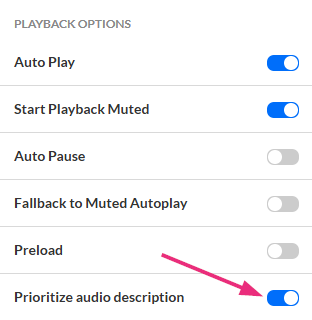
See our article Prioritize audio description for more information.
Sort audio tracks alphabetically (Video, Audio & Reels Player)
Audio tracks in multiple languages can now be displayed alphabetically instead of by upload order. This makes it easier for viewers to find their preferred language.

See our article Enable alphabetical sorting for audio tracks for details.
CPE Tracker
The player now supports Continuing Professional Education (CPE) tracking, helping viewers earn certifications by watching designated sessions (live or simulive).
This update elevates the player from a passive viewing tool into an active environment for learning and accreditation.
- Progress indicator – shows that watch time is being recorded
- Remaining time display – shows how much longer viewers must stay engaged
These features provide transparency and guidance so viewers always know their participation is being tracked and how much time remains to qualify.

See our article CPE tracker plugin to learn more.
Banner messages
Publishers can now display overlay banners directly within the video experience without disrupting playback. This is useful for disclaimers, promotions, or alerts.
Message types -
- Temporary – visible for a defined duration (e.g., first 10 seconds).
- Persistent – visible for the entire playback.

See our article Banner message on player to learn more.
Resolved issues
| ID # |
Description |
| ADA-2892 | Hotspots are now announced when they appear and can be activated via keyboard. |
| ADA-2964 | YouTube videos now have a single Play button. Title 'entry title' " is announced. |
| ADA-2969 | Unnecessary aria-label was removed from the <video> area. |
Includes: Kaltura Player (V7)
Date: October 26, 2025
Resolved issues
| ID # | Description |
| ADA-2031 | Implemented label elements, aria-labels, or aria-labelledby attributes to ensure WCAG 2.1 compliance. |
| ADA-2709 | The “Advanced captions settings” is now being announced as part of the captions menu with a visual separator. |
| ADA-2781 | Pressing Enter on the pre-playback Play button no longer causes the player to enter full-screen mode, and hotspots do not steal focus when they appear. |
| ADA-2815 | The volume slider dimensions were adjusted to 24x112 pixels, and the contrast was corrected. |
| ADA-2901 | In multiple-choice and true/false questions, only the selected (or first) answer can be reached with the Tab key. The rest are skipped, and you can move between answers using the arrow keys. |
| ADA-2908 | Replaced the logo’s aria-label with an empty alt attribute to better meet WCAG 2.1 guidelines. |
| ADA-2913 | The <video> element was hidden from assistive technology by adding aria-hidden=“true”, ensuring only custom controls are announced. |
| ADA-2920 | The ESC key now closes popups, menus, and popovers across components. When a popup (like “More transcript options”) is opened, focus moves inside it; pressing ESC closes it and returns focus to the trigger button. |
| ADA-2976 | On small players the first focused dropdown no longer auto-opens when opening the “Set custom captions” page. |
| ADA-2977 | Added a valid role (“region”) to the div container to improve accessibility compliance. |
| ADA-3035 | When focused on a cue point, the timeline preview now can be dismissed with ESC key. |
| ADA-3037 | All content, including the email address, now reflows correctly at 320px width. Important information remains visible and readable for users with low vision. |
| FEC-14571 | Added translations for internationalization (i18n) (transcript options). |
| FEC-14604 | Added translations for internationalization (i18n) (Info, Video Info, uiManagers, moreIcon). |
| FEC-14644 | Added translations for internationalization (i18n) (quiz popup shortcut). |
| FEC-14673 | Adjusted the proximity of the speed button to the seek 10 back button in the audio player UI. |
| SUP-47902 | Fixed an issue where questions appeared incorrectly or in the wrong timeline positions when videos contained 7 or more chapter markers (commonly from Lecture Capture). The timeline now displays questions correctly regardless of the number of chapter markers. |
| SUP-49557 | Fixed an issue where combining multiple clips into a playlist or larger video could cause infinite loading. |
| KMS-32100 | Preview now displays when embedding YouTube videos. |
Includes: Kaltura Player (V7)
Date: October 5, 2025
Resolved issues
| ID # | Description |
| FEC-14649 | Integrated FPS (FairPlay Streaming, Apple's DRM) Safari using Modern EME APIs. |
| FEC-14657 | Upgraded to HLS version 1.6.12. |
| FEC-14593 | Added keyboard shortcuts for Quiz popup - Shift + Alt + Q and Shift + Option + Q shortcuts move the focus on the "Review" button in the popup. |
| SUP-49640 | A fix has been implemented in CTA, ensuring words are not cut and allowing for three lines in long descriptions. |
| ADA-2900 | Added an aria-labelledby to true/false question radiogroup element for proper accessibility. |
| ADA-2917 | Added arrow keys navigation to Transcript side panel. |
| ADA-2919 | Added arrow keys navigation to popover menu. |
| ADA-2921 | Fullscreen button now has focus indicator while in fullscreen mode. |
| ADA-2975 | In settings menu, while navigation with the keyboard, the focus indicator is no longer overlapping the Quality label when Auto is set. |
| ADA-2922 | On small screens, center play/pause is no longer present and focusable when pre-playback is present. |
Includes: Kaltura Player (V7)
Date: September 14, 2025
Resolved issues
| ID # |
Description |
| SUP-45260
|
Resolved picture-in-picture (PiP) issues in the v7 player for dual screen streams, focusing on correct PiP behavior with secondary streams and small player sizes.
|
| ADA-2810
|
Adjusted the opacity and added a border to the seek bar to improve contrast.
|
| SUP-49286
|
Resolved a security concern (CVE-2022-25927) and updated ua-parser-js to versions 1.0.36/1.0.37 used in Kaltura's embedded player.
|
| FEC-14592
|
Announce popup buttons to screen readers.
|
| FEC-14603
|
The focus indicator for IVQ items is now visible in the player.
|
| FEC-14599
|
Adjusted various quiz dialog elements outline and spacing issues, improving focus indicators.
|
| ADA-2303
|
The focus indicator thickness was increased from 1px to 2px per color band to meet WCAG standards.
|
| ADA-2706
|
Updated quiz completion dialogs to use role="dialog" with an aria-label for proper screen reader announcement.
|
| SUP-49609
|
A fix was implemented to allow live entries to play even when the EAD plugin is enabled.
|
Includes: Kaltura Player (V7)
Date: August 31, 2025
Resolved issues
| ID # | Description |
| SUP-49180 | Resolved distorted audio issues in VOD entries. |
| ADA-2810 | Adjusted seek bar opacity, added borders, and improved visual distinction. |
| ADA-2960 | Added an aria-label to the container of the video for accessibility. |
| FEC-14475 | Opening advanced captions settings through the CC bottom bar button in the player now works. |
| ADA-2947 | Removed aria-description and ensured screen readers announce correct descriptions for volume controls. |
| ADA-2938 | Dropdown and items in the list under "Set custom captions" in the "Advanced captions settings” modal are now correctly announced by screen readers. |
| ADA-2934 | On accessing the item present in ‘Quality’ menu, for the item such as 1080p, 720p; the pixel information is now conveyed properly to screen readers. |
| ADA-2923 | On Selecting ‘Bring Transcript Back’ button focus now return to the "Search in transcript" input for consistency and improved user experience. |
| SUP-49327 | Fixed issue where multiple embedded RAPT media players on a single page caused node malfunctions on Mac devices; hotspots in the first player now persist correctly after click. |
Includes: Kaltura Player (V7)
Date: August 17, 2025
What's new?
Prioritize regular audio tracks (video, audio and reels player)
When multiple audio tracks in the same language are uploaded (like regular audio and audio description), the player will default to the regular audio track.
This behavior relates to playback of audio tracks and determines which audio track will be played by default.
See our Knowledge Center article.
Resolved issues
| ID # | Description |
| FEC-14583 | Add AD audio track priority control in uiconf and local storage when tracks have identical language |
| FEC-14578 | [DRM] playkit-js changes to support uDRM CPIX multikey solution for HLS FPS |
| SUP-48817 | Entries under moderation will no longer play until moderated |
| FEC-14592 | “Quiz completed” buttons (X, review, submit) are now announced by screen readers when it pops up |
| PSVAMB-90052 | Enhanced V7 playlist player to support “trPlaylistServices” plugin |
| FEC-14623 | Player v7: Player controls were missing on legacy Video Portal with Theming enabled |
| ADA-2928 | Added a visible name to the ‘Set Custom Caption’ dialog present within the video |
| ADA-2810 | Visual improvements to the seek bar to better convey control state |
| SUP-49217 | It is now possible to select Download Pre-Test in Video Quiz based on YouTube entries in v7 player |
| FEC-14517 | As a client playing CENC/DASH DRM protected content, in case of DRM error, we now fallback to AES128 |
Includes: Kaltura Player (V7)
Date: August 3, 2025
Resolved issues
| ID #
|
Description
|
|---|---|
| SUP-48817
|
Revert fix for Entries Under Moderation Are Still Playing |
| ADA-2854
|
Modified slider to move by 1 second steps when using keyboard navigation |
| SUP-48894
|
Audio flavor selector bug | Top most option is now selectable |
| ADA-2905
|
Ensure collapsed announcement is not duplicated for Settings button/menu |
| ADA-2888
|
Component on Captions Advanced Settings Interface lacks 3:1 Contrast Ratio | Slider background was updated to meet color contrast requirements |
| ADA-2303
|
Report section color contrast | focus indicator thickness was changed from 1px to 2px per color band in player |
| FEC-14598
|
Transcript elements now have 2px color band focus indicator on focus-visible state |
| ADA-2313
|
Locale on player buttons | Added translation to ariaLabel for transcript button |
| FEC-14603
|
IVQ focus indicator margins are cut | updated the focus indicator |
| FEC-14599
|
IVQ dialog items have 1px borders instead of 2px | updated borders |
| ADA-2706
|
Popup is now announced when appearing including using keyboard navigation |
| SUP-48870
|
Transition Tool issue for V2 - V7 Audio Players | Added audio player in choices of Players to redirect to |
| FEC-14601
|
Reels - Volume slider no longer overlaps volume button when “Watch full video” is shown |
| FEC-14455
|
Design changes to reels player | Description is removed and shadow was applied to ensure accessibility |
| CR-433
|
S&C Auto-play preview player on mute |
Includes: Kaltura Player (V7)
Date: July 20, 2025
What's new?
Text Protection
Administrators can now block highlighting and copying text in the player. When enabled, Text Protection prevents users from highlighting, selecting, and copying text in transcripts, captions, and Q&A content. The feature can be enabled via the Player Studio (default is disabled).
See our Knowledge Center article for more details.
Timeline sound visualization (Beta)
Audio waveform visualization can now be displayed on the player timeline when enabled. This enhancement provides listeners with better navigation abilities and visual feedback, making it easier to find specific audio segments and navigate through content more efficiently. The feature can be enabled via the Player Studio (default is disabled).

Check out our Knowledge Center article for more details.
Resolved issues
| ID # |
Description |
| FEC-14574 |
Fix regression where normal speed is not saved properly |
| SUP-48817 |
Entries under moderation are still playing |
| FEC-12711 |
Add default playback rate and respect users preference |
| FEC-14557 |
Log analytic failure events |
| SUP-48817 |
Entries under moderation are still playing |
| ADA-2781 |
Pre playback play focus management |
| SUP-48894 |
Audio flavor selector bug |
| ADA-2304 |
Change dropdown hover background color |
| FEC-14569 |
Correct russian translation and remove duplicates |
| FEC-14467 |
Volume control italian translation |
| SUP-48552 |
Missing translation in player v7 |
| FEC-14467 |
Volume control translations |
| ADA-2838 |
Add alt attribute to img |
| ADA-2781 |
Stop focus jumping on hotspot |
| FEC-14467 |
Transcript popup translation |
| ADA-2313 |
Transcript translation |
| FEC-14575 |
When running multiple players using the Dual Screen plugin, non-primary players should inherit config from the primary |
| ADA-2797 |
Fix quiz issues |
| FEC-14467 |
Duration translations |
Includes: Kaltura Player (V7), Player Studio
Date: July 6, 2025
What's new?
- Extended audio description additions and updates - The plugin that enhances video accessibility for viewers with visual impairments has been further improved. You can now pause text-to-speech playback and enjoy smoother navigation with our updated keyboard shortcuts.

See our Knowledge Center article for more details.
Resolved issues
| ID | Description |
| SUP-47563
|
EAD Not Available on Publicly Accessible Videos
|
| ADA-2798
|
The CTA button has focus initially, but it does not maintain the outline
|
| SUP-47527
|
Video Playback Issue in V7 Players
|
| ADA-2881
|
Accessibility Controls in V7 Player
|
| ADA-2784
|
Advanced captions settings - Apply Button under Edit Captions is not accessible via keyboard Enter key
|
| ADA-2799
|
Advanced captions settings | Ensure content updates define focus updates appropriately
|
| ADA-2313
|
Locale on player buttons
|
Includes: Kaltura Player (V7), Player Plugins, Player Studio
Date: June 22, 2025
What's new
- Player debug keyboard shortcut - It's now possible to trigger the player debug feature with a keyboard shortcut:
- Ctrl + Alt + Shift + D (Windows/Linux)
- Control + Option + Shift + D (macOS)
See Troubleshooting the player for information.
- Link to original video - When watching a clip, viewers can now easily navigate to the original full content from which the clip was created. The feature can be enabled and disabled via the player settings (default is disabled). See Link to original video and Player - Settings tab for more information.

Resolved issues
| ID | Description |
| ADA-1281 | Multiple V7 player oEmbeds only displaying first embed on page
|
Includes: Kaltura Player (V7), Player Plugins, Player Studio
Date: May 25, 2025
What's new
- Debug info: The Kaltura Player now offers a debug info retrieval function, ideal for support ticket submission. Simply right-click (or long-press on mobile) anywhere on the player surface to download a comprehensive report containing browser and device specifications, Entry ID, plugin configuration status, and more. The report is provided in JSON format and is available to all users.
This streamlined process helps the Support team quickly diagnose issues, reducing resolution timeframes. To learn more, see Troubleshooting the player.

Resolved issues
| ID | Description |
| SUP-48030
|
Display issue on playlist with blocked and non-blocked content
|
| ADA-2778 | Missing labels |
| ADA-2794 | Accessible name of the volume slider contains usage instructions
|
| ADA-2785
|
Advanced caption settings movement behaves strangely via keyboard navigation
|
| ADA-2781 | Pressing the Enter key on the play button opens the video in full-screen mode
|
| ADA-2127 | Accessibility issue on Android phone | Talkback reads unable to play media
|
| ADA-1736 | Tooltips not showing on V7 in Moodle
|
Includes: Kaltura Player (V7), Player Plugins, Player Studio
Date: March 9, 2025
What's new
- Extended audio description: This new Kaltura Player plugin creates a more inclusive viewing experience, enabling viewers with visual impairments to experience videos more fully. To learn more, see Extended audio description.
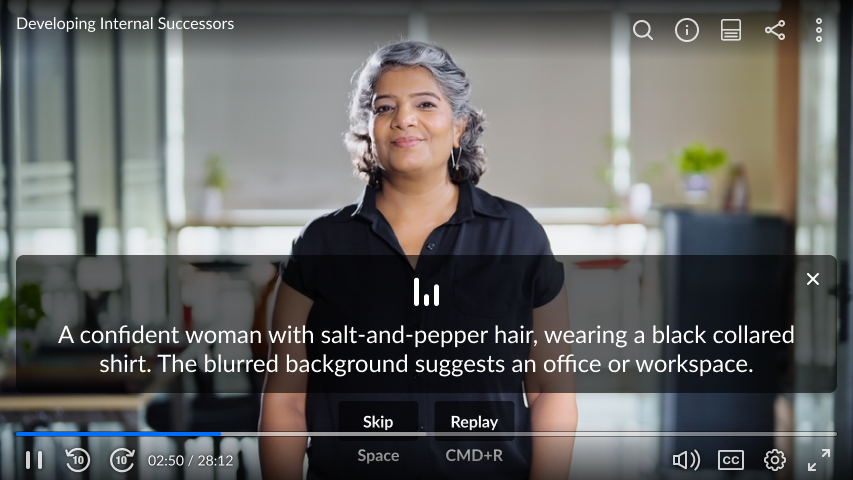
- Metadata-based CTA: Now available in V7 Player, this feature allows users to create custom CTAs for their videos based on the entry’s metadata. It allows to modify the title, description and buttons of CTAs on a per-entry basis. To learn more, see Call to Action (CTA) plugin.
- Improved stream failover: The failover duration between primary and secondary streams in live streaming has been significantly reduced, minimizing the time it takes to switch from the main stream to the backup stream during connection failures. This improvement provides viewers with a noticeably smoother streaming experience. Please note this will require a unique delivery profile.
Resolved issues
| ID | Description |
| SUP-46750 | Interactive videos don’t send data to google analytics when user opts out of cookies |
| SUP-45555 | Fix for missing captions in Safari |
| SUP-45260 | Support for picture-in-picture with dual screen |
| SUP-40290 | Jump to first search result in transcript upon search |
| SUP-45432 | Improved support of floating plugin on pages with multiple players |
Includes: Kaltura Player (V7), Player Plugins, Player Studio
Date: February 9, 2025
What's new
- Dynamic watermark link - Add a dynamic link to your watermark on the Kaltura Player. This feature redirects users who are watching the video in a different location back to your legacy Video Portal, resuming where they left off. Get started on creating a dynamic URL by adding {entryId} to the website address, like this: https://mycompanymediaspace.com/media/{entryId}
The link updates based on the entry ID that is being played. To learn more: Player - Visual tab.
Resolved issues
| ID | Description |
| SUP-44787 | Support for Catalan language localization |
| SUP-45709 | Seek forward disabled alert added in interactive video quizzes |
| SUP-46065 | Custom tag for VR plugin |
| SUP-46543 | Gradebook issue fix in V2-V7 embed redirect tool |
Includes: Kaltura Player (V7), Player Plugins, Player Studio
Date: January 7, 2025
What's New
- Live viewers counter: We’re happy to introduce a new update to the live plugin that allows admins to expose the number of viewers that are watching live directly on the player.
More info: Live - Multi-language transcript support on audio player: Users can now select the language of the transcript from within the transcript plugin, allowing users to select the transcript language in audio player.
More info: Transcript and Audio Player
Includes: Kaltura Player (V7), Player Plugins, Player Studio
Date: December 22, 2024
What's New
- Reels Player: We’re thrilled to introduce the Playlist Reels Player, designed to effectively promote content through a sleek, user-friendly interface optimized for short videos that encourage seamless content browsing.
More info: Reels playlist player - Audio/Reels support in Studio: The Studio now supports additional player skins such as audio and reels, with a dedicated settings area for each. Thus, providing admins with a seamless player setup flow for all player skins.
More info: Player - Settings and Player - Visual - Share plugin on audio player - The share plugin is now available on the audio player.
More info: Audio player - Additional streams download: Viewers can now download additional streams of the content (secondary entries) from the download plugin.
More info: Player - Download
Resolved Issues
| ID | Description |
| SUP-45037 | Chapter title and timeline timestamp conflict fix |
| SUP-45956 | Share clip bug fix |
Includes: Kaltura Player (V7), Player Plugins, Player Studio
Date: November 20, 2024
What's New
- V2 to V7 transition tool - we’re excited to share the release of the new Player V2 to V7 transition tool, available now in the Rich Media Content Management System. This tool provides another way to support your ongoing migration efforts. The tool will be available in the Player Studio that can be accessed via Rich Media CMS by going to Studio > v7 Transition tool. Click for the complete how-to guide.
Resolved Issues
| ID | Description |
| SUP- 43295 | Save audio flavor (audio description included) in user preferences in browser local storage |
Includes: Kaltura Player (V7), Player Plugins, Player Studio
Date: September 22, 2024
What's New
- Player v7 accessibility update - The Kaltura Player v7 has successfully passed the audits of our accessibility partner. We will continue to monitor and address all customer accessibility tickets to ensure Kaltura Player adheres to the highest accessibility standards. VPAT v2.5 can be found here: https://knowledge.kaltura.com/help/accessibility-in-kaltura-products
Resolved Issues
| ID | Description |
| SUP-43778 | Hotspot formatting modification |
| SUP-43014 | Specified error message for IP restriction |
| SUP-38407 | Video quality button for additional streams |
| SUP-40019 | Fix for thumbnails not loading in interactive videos |
Includes: Kaltura Player (V7), Player Plugins, Player Studio
Date: September 8, 2024
Resolved Issues
| ID | Description |
| SUP-42574 |
German translation added to navigation |
| SUP-43592 | Cue points showing on Youtube ingested video quizes |
| SUP-44085 | Audio player and video player loading on same page fix |
Includes: Kaltura Player (V7), Player Plugins, Player Studio
Date: August 25, 2024
Resolved Issues
| ID | Description |
| SUP-43895
|
Advanced audio description button on bottom bar fixed |
| SUP-43316 | Fix for adding url to IVQ questions |
Includes: Kaltura Player (V7), Player Plugins, Player Studio
Date: August 5, 2024
Resolved Issues
| ID | Description |
| SUP-43378
|
Volume bar hiding timeline fix |
| SUP-43350 | Webcasting announcements fix |
Includes: Kaltura Player (V7), Player Plugins, Player Studio
Date: July 14, 2024
What's New
- Transcript on audio player - The transcript plugin is now available on the audio player.
More info: https://knowledge.kaltura.com/help/the-kaltura-audio-player
How to enable: https://knowledge.kaltura.com/help/how-to-create-a-kaltura-player
Resolved Issues
| ID | Description |
| SUP-42112
|
Advanced captions now working on iOS |
Includes: Kaltura Player (V7), Player Plugins, Player Studio
Date: June 30, 2024
Resolved Issues
| ID | Description |
| SUP-42321 | iOS playback issue was fixed |
Includes: Kaltura Player (V7), Player Plugins, Player Studio
Date: June 16, 2024
What's New
- Transcript pop out - users can now pop out the transcript into a floating, draggable, and resizable window, allowing for full-size video viewing. More info: https://knowledge.kaltura.com/help/transcript
Resolved Issues
| ID | Description |
| SUP-42112 | Advanced caption settings fixed on iOS |
| SUP-42730 | Fix for issue with captions not being displayed |
Includes: Kaltura Player (V7), Player Plugins, Player Studio
Date: June 2, 2024
What's New
- Admins can now use the parameter {entryId} in the share link of the Share & Embed plugin, for example: https://mycompanymediaspace.com/media/{entryId}, and the link updates according to the entry ID of the video being played. More info: https://knowledge.kaltura.com/help/the-kaltura-player-studio-admin-guide-player-settings
- Extended audio description can now be accessed directly from the bottom bar of the player.
Resolved Issues
| ID | Description |
| SUP-42252 | Analytics reporting of clipped media was fixed |
| ADA-888 | Loss of focus and arrow navigation accessibility improvements |
| SUP-38665 | ACP doesn't require kaltura.com in whitelist |
Includes: Kaltura Player (V7), Player Plugins, Player Studio
Date: May 19, 2024
What's New
- Prevent seek / prevent forward seek - You can now disable seeking on a player or a specific entry by adding metadata. You can decide whether to completely disable seeking or just disable seeking forward beyond the maximum current seek time. For more information, please visit: https://knowledge.kaltura.com/help/the-kaltura-player-studio-admin-guide-player-settings
- Default player ratio - Admins can now set the default ratio (width and height) of the player directly from studio. The values that are set will be used in player embed codes that are generated by embedding tools such as Rich Media CMS share & embed tool and player share & embed plugin. For more information, please visit https://knowledge.kaltura.com/help/the-kaltura-player-studio-admin-guide-player-settings#default-player-ratio
Resolved Issues
| ID | Description |
| SUP-42354 | Enable/disable captions keyboard shortcut was fixed |
| SUP-42476 | v7 eCDN fallback fix |
| SUP-41857 | System attachments are no longer shown in download plugin |
Includes: Kaltura Player (V7), Player Plugins, Player Studio
Date: May 5, 2024
What's new?
- Captions alignment - Admins can now select the default text alignment of the captions during playback (left, centered, right-aligned). Users can also change the alignment in the advanced captions settings.
https://knowledge.kaltura.com/help/the-kaltura-player-studio-admin-guide-player-settings
https://knowledge.kaltura.com/help/player-captions
Resolved Issues
| ID | Description |
| SUP-41468 | Captions languages are now alphabetically ordered in captions menu |
| SUP-41844 | Last slide appears on live (DVR disabled) for users that joined after slide was shared |
| SUP-41465 | Playlist side panel layout issues on mobile were fixed |
Includes: Kaltura Player (V7), Player Plugins, Player Studio
Date: April 17, 2024
What's new?
- Audio player branding - Customize the appearance of the audio player to match your brand perfectly. For more info: https://knowledge.kaltura.com/help/how-to-create-a-kaltura-player
- Player error messages - the player error message now includes additional information to help the viewer understand the error and troubleshoot where possible. For the full list of error messages: https://knowledge.kaltura.com/help/troubleshooting-the-player
- Document entries in playlist - Add a document file to the player! When a document entry is loaded in a Kaltura player, a slate will display instructions how to view the document. If the document isn't available for viewing, admins can add a download button. More info: https://knowledge.kaltura.com/help/the-kaltura-player-studio-admin-guide-player-settings
- Ad blocker detection - The new ad blocker plugin detects ad blockers and informs the user about it. Then it takes action according to the admin's preferences in the plugin's settings, like blocking viewer's playback. Ad blockers can interfere with analytics collection or cause unwanted behavior in features that are based on viewership data, such as certifications, badges, leaderboard, and lead reports on viewership-based events. For more info:https://knowledge.kaltura.com/help/ad-blocker-detection
https://knowledge.kaltura.com/help/the-kaltura-player-studio-admin-guide-player-settings
Resolved issues
| ID | Description |
| ADA-190 | Player elements are focused on when bottom bar is hidden. |
| SUP-41001 | Download button now appears when captions are processing. |
| SUP-42158 | Missing German translations were added. |
Includes: Kaltura Player (V7), Player Plugins, Player Studio
Date: March 31, 2024
What's New
- Hotspots on pre-recorded sessions - Hotspots are now available on per-recorded sessions! Simply add hotspots in the source VOD entry, and they'll automatically show up on the webcast entry when it's broadcasted. More info: https://knowledge.kaltura.com/help/kaltura-video-editing-tools---hotspots-tab
Resolved Issues
| ID | Description |
| SUP-41353 | Playlist sidebar is not disabled by pre/post live slate |
| SUP-41626 | Interactive video fix for mobile iOS |
Includes: Kaltura Player (V7), Player Plugins, Player Studio
Date: February 25, 2024
What's New
- Floating player - Users can now easily return to the video from the floating player by clicking the "Back to video" button that was added to the floating player. More details: https://knowledge.kaltura.com/help/floating
Resolved Issues
| ID | Description |
| SUP-41353 | Playlist sidebar is not disabled by pre/post live slate |
| SUP-38484 | Transcript download menu cut off fix |
Includes: Kaltura Player (V7), Player Plugins, Player Studio
Date: February 4, 2024
What's New
- Email (mailto:) Hotspots - create a "mailto:" hotspot that will open a new email and autofill the address based on the hotspot setup. More details: https://knowledge.kaltura.com/help/v7-player-plugins-hotspots
- Dynamic logo link - add a dynamic link to your logo on the Kaltura Player to boost traffic and engagement. This allows to redirect users watching the video on a different location, right back to your legacy Video Portal, to continue where they left off. Get started on creating a dynamic URL by adding {entryId} to the website address, like this: https://mycompanymediaspace.com/media/{entryId}. The link updates based on the entry ID that is being played. Learn more: https://knowledge.kaltura.com/help/kaltura-player-plugins-logo
- Download Plugin - You can now decide which assets (source media, additional flavors, attachments or captions) are available for users to download from the download plugin directly in the Player Studio
More details: https://knowledge.kaltura.com/help/the-kaltura-player-studio-admin-guide-player-settings
Resolved Issues
| ID | Description |
| SUP-40375 | Duration format in SEO Plugin modified to follow the ISO 8601 standard. |
Includes: Kaltura Player (V7), Player Plugins, Player Studio
Date: January 24, 2024
What's New
- Call To Action - add prompts during video playback to increase viewer interaction. Your CTAs can link to any online location or direct viewers to another video entry. Start using your Call to Action plugin today:
Learn how to set it up: https://knowledge.kaltura.com/help/the-kaltura-player-studio-admin-guide-player-settings
More details: https://knowledge.kaltura.com/help/call-2-action - Download plugin - you can now disable the option to download the source media while the download plugin is enabled to allow users to only download captions or attachments.
Resolved Issues
| ID | Description |
| SUP-40351 | Corrected typo in Spanish translation |
| SUP-40335 | No seek forward on IVQ |
| SUP-40702 | Fix for cue points not showing on timeline |
| SUP-40735 | Corrected text of "Stay on latest version" configuration in Player Studio |
Includes: Kaltura Player (V7), Player Plugins, Player Studio
Date: December 12, 2023
What's New
- Share - we've expanded our Kaltura Player sharing capabilities- users can now share and embed a clip of the video. More details: https://knowledge.kaltura.com/help/share
- Skip intro/outro - Add the option for viewers to skip a length of the entry's into/outro, now available to configure right from the player studio. Entries that have the intro and outro configured in their metadata will override the default values set in the studio. More details:
https://knowledge.kaltura.com/help/skip-introoutro
https://knowledge.kaltura.com/help/the-kaltura-player-studio-admin-guide-player-settings - Speed selection - users speed selection will now be saved when moving between videos during the same browser session. To get started, turn on "apply user preferences" configuration in the Player studio. More details: https://knowledge.kaltura.com/help/the-kaltura-player-studio-admin-guide-player-settings
- Live - Pre and post live broadcast video slates - audio support was added. More details: https://knowledge.kaltura.com/help/live
Includes: Kaltura Player (V7), Player Plugins, Player Studio
Date: November 12, 2023
What's New
- Audio Player - we've added a new audio player with a slim UI that is easily embedded on any webpage. More details: https://knowledge.kaltura.com/help/the-kaltura-audio-player
- Pre and Post live broadcast slates
- Pre and post live broadcast slates enables admins to add a video or image before the live broadcast begins and after it ends.
More details: https://knowledge.kaltura.com/help/live
- Pre and post live broadcast slates enables admins to add a video or image before the live broadcast begins and after it ends.
- Download Plugin - The following improvements were made to the download plugin:
- Users can now select the flavor of the video they would like to download
- Users can now download attachments directly from the player
- Users can now download captions
- The download plugin is now available on image entries as well.
More details: https://knowledge.kaltura.com/help/player-download
- Navigation plugin - The following improvements were made to the timeline:
- Cue points are now represented on the timeline
- Chapter segments are now represented on the timeline
- Clickable dual screen navigation thumbnails supported added to the timeline
More details: https://knowledge.kaltura.com/help/v7-player-plugins-navigation
Includes: Kaltura Player (V7), Player Plugins, Player Studio
Date: October 8, 2023
What's New
- Thumbnail embed - decrease page load time with thumbnail embed. The embedded video will display the video thumbnail image, and only load the player when the play button is clicked. For more details: Share and Embed Media.
- SEO Plugin- The Search Engine Optimization (SEO) - enable to improve indexing and ranking of videos in search results. The SEO plugin embeds the video's metadata into the hosting webpage code, to learn more: https://knowledge.kaltura.com/help/seo-plugin
Resolved Issues
| ID | Description |
| SUP-38805 | Hero unit causing page to jump to the top fix |
| SUP-39123 | Video quiz seeking issue was fixed |
Includes: Kaltura Player (V7), Player Plugins, Player Studio
Release date: August 22, 2023
Version Highlights:
Pre/Post Live & Error slates branding and customization
The player now allows customisation of pre-live, post-live and error slates per player ui conf.
By default the player will use the live-entry thumbnail as a background image for the “brodcast not started” and “broadcast ended” slates. We have also added the ability to customise the experience by providing a URL to an alternative background image for each of the slates. Check the updated Live Plugin and Player Studio articles for more details.
Additional content:
- Improved multi-stream experience on Safari web browser.
- Fixed the issue where youtube entries would fail to play in playlists.
Includes: Kaltura Player (V7), Player Plugins, Player Studio
Date: July 3, 2023
Version Highlight
When using the dual screen plugin, the Kaltura player now can support playback of up to four video streams. These stream are setup in a "parent-child" relationship where the primary stream is the parent entry with up to 3 additional streams (or, alternatively, 2 video streams and a set of embedded slides), linked as child entries. Users can choose at any given moment which stream they want to see as the primary video and which as the secondary video.
Check this knowledge article for details.
Additional content
- Shaka player upgrade to v4.3.7
- Added Spanish language support for in video quizzes
- Fixed a User Interface issue where dropdown menues would not close automatically upon button click.
Includes: Kaltura Player (V7), Player Plugins, Player Studio
Date: May 21, 2023
What's New
- Users can now download the video they are watching directly from the player. Enable the ‘download’ plugin on the player studio to add this capability to you player.
- Less is more! Video transcript download is now available within the navigation plugin instead of having to add a separate download button.
- Player and plugins localization - we’ve added translations to the player’s UI labels for the following languages: Spanish, German, Finnish, French, Italian, Japanese, Korean, Chinese, Portuguese, Dutch, Russian
- Search video quizzes on navigation plugin - Navigation plugin now allows users to search through questions on video quizzes.
- VPAT accessibility report for V7 Player and player plugins now available here
- We’ve moved Captions settings into the gear shaped settings menu
 . The globe icon
  was removed and now users can enable and disable captions from a dedicated CC button
  located on the player bar.
 - Dual screen now supports playback speed selection.
- DASH and HLS frameworks upgrades.
- shaka player v4.3.5
- hls.js 1.3.5
- Bug Fixes.
 . The globe icon
  was removed and now users can enable and disable captions from a dedicated CC button
  located on the player bar.
Note- Users using players configured to support “RAPT” should update their uiconf on the rapt config from "rapt" to "playkit-rapt" to get the interactive videos feature software updates
Includes: Kaltura Player (V7), Player Plugins, Player Studio
Date: February 1st, 2023
What's New
Kaltura Player and Plugins
Library versions upgrades
- hls.js library updated to v1.3.1
- Shaka Player library updated to v4.3.3
Bug fixes
- Fixed some accessibility related bugs
- Related videos UI improvements
- Added missing ISO language codes support for multi-audio track videos
- Fixed a UI issue in fullscreen youtube video playback
- Fixed UI issues in the dual screen plugin
- Fixed UI issues in the Video Quiz plugin
Kaltura Player Studio - Version 7.59
- Updated to allow show captions, auto scroll and skip ahead.
- Added the ability to customize player colors including scrubber, LIVE label and player's background color.
Includes: Kaltura Player (V7), Player Plugins, Kaltura Player Studio
Date: January 1, 2023
What's New
Kaltura Player
Everyone uses our player- to watch videos, study, learn something new, re-skill, onboard,andstream a live broadcast. Now the new Kaltura Player enters the ring- faster to load, intuitive to create and customize to your needs, ready to set upin our beautiful new studio. Everything you know, now 10x better.
Frustration free player
Intuitive from ‘create’ to embed, our new Kaltura Player is easy to set up and customize to fit your organization’s exact needs. Viewers enjoy an intuitive playback experience with enhanced functionality. As always, Kaltura is committed to continuously promoting accessibility throughout our products.
Olympic level performance
Unparallel load time, stability,and performance are what you’ll get with the new Kaltura Player. We’ve enhanced these capabilities for a smooth, & seamless user experience— blink and it’s ready for action.
Bespoke viewer experience (Without the overhead)
Design and curate a unique set of players, tailored to your organization’s needs based on the desired experience. Make a lasting first impression on your viewers with a powerful player experience. Inspire your internal audiences (marketing, HR, etc.) to be the catalyst for their creativity.
Kaltura Player Studio
Brand new Studio! - We are happy to launch the Kaltura Player Studio for Player V7, replacing the TV Platform Studio, with improved UI and advanced players management capabilities:
- Create and edit players
- Players usage analytics
- Bookmark favorite players
- Player templates
- Demo videos to showcase player capabilities
- Advanced plugins configuration
- Visuals and integrations
For more info visit Kaltura Player Studio.
Includes: Kaltura Player (V7), Player Plugins, Kaltura Player Studio
Date: 2023
What's new?
We welcome you to track the monthly Newsletter that is sent to our customers with updates about the Kaltura Player. Also, please visit the GitHub main repo for the Kaltura Player release notes, click here.
