About
The Basesiteregistration module is the foundation for registration features. It enables site registration, invitation-based registration, and external registration.
Using this module, admins can:
- Create and edit the site’s registration form
- Control registration branding and security
- Define which users can edit or unregister after registering
- Configure event-related attendance tracking
Dependencies
- Theming module
- EmailTemplates module
- EmailService module
- Advancedkauth module (required if SSO is not used)
- An Event ID must be generated from the Application module.
This is a legacy Video Portal-only module.
Configure
1. Go to your Configuration Management console, and click on the Basesiteregistration module. You can also navigate directly using a link: https://{your_site_URL}/admin/config/tab/basesiteregistration.
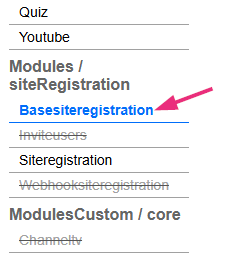
The 'Basesiteregistration' page displays.
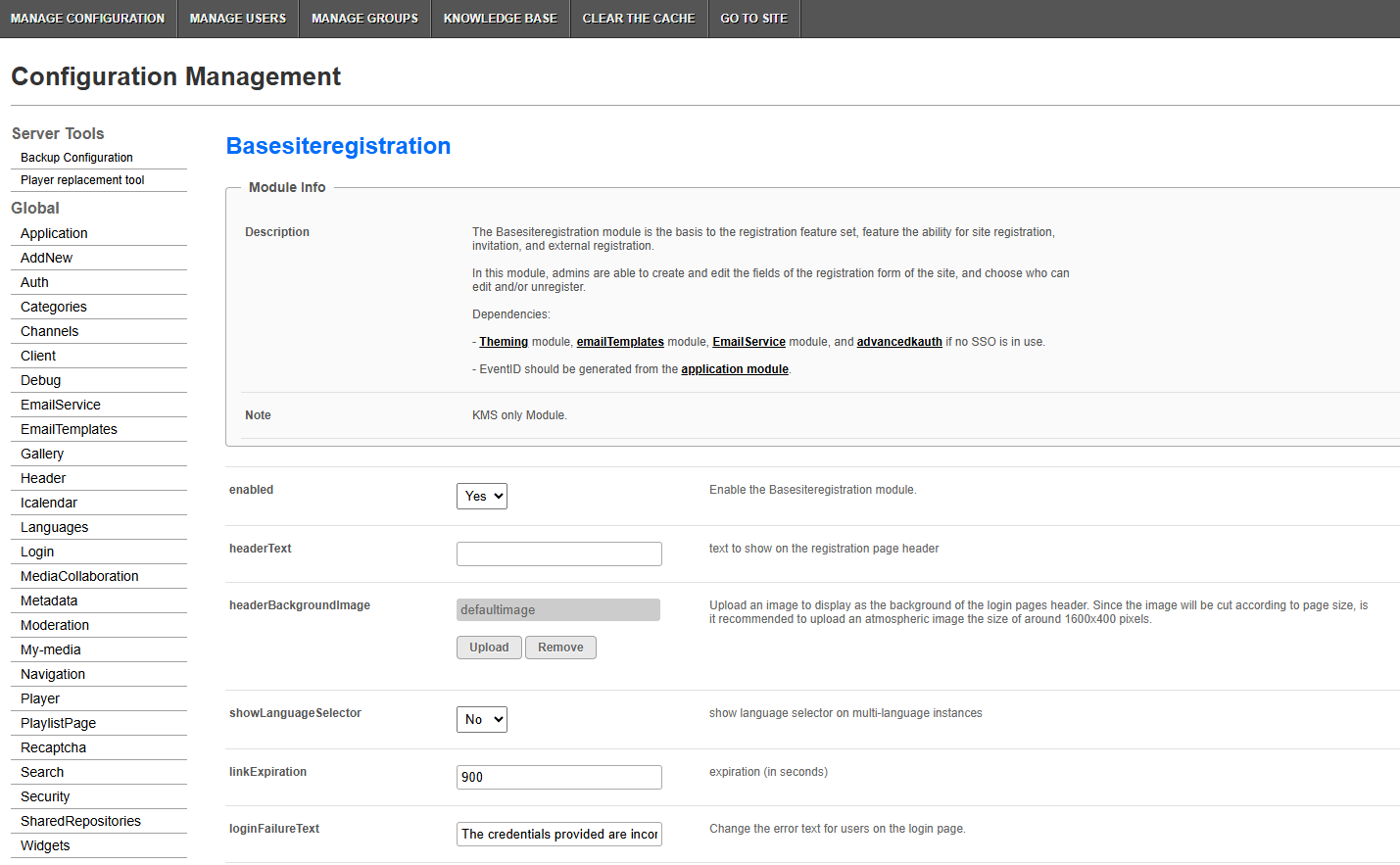
2. Configure the following:
enabled - Set to 'Yes' to enable the module.
headerText - Enter the text displayed in the header area of the registration page.
headerBackgroundImage - Upload an image to display as the background of the registration and login page header.
Since the image is cropped based on screen size, use an atmospheric image sized around 1600 × 400 px.
showLanguageSelector - Set to 'Yes' to display the language selector on multi-language instances.
linkExpiration - Enter how long (in seconds) registration and verification links remain valid. Default is 900 seconds.
loginFailureText - Customize the error message shown on the login page after a failed login attempt. The text can include HTML links, such as a link to resend the activation email.
Registration form
registrationForm - Click to open the Registration Form Editor, where you can create and edit the registration form fields.
Event attendance logging
loginLogFrom - Enter the start date of your event as a Unix timestamp.
This value is used:
- for calendar invites, if enabled
- to determine registration status:
- Users who log in before this time are marked as 'Attended'
- Users who log in after this time are marked as 'Participated'
Leave empty to mark all logged-in users as 'Attended'.
loginLogTo - Enter the end date of your event as a Unix timestamp. This value is used for calendar invites, if enabled.
Verification page
verificationSentTitle - Enter the title displayed on the page shown after a user requests email verification (/registration/verify).
verificationSentText - Enter the text displayed on the page shown after a user requests email verification (/registration/verify).
CAPTCHA and security
useCaptcha - Set to 'Yes' to enable reCAPTCHA on the registration form and activation page. If enabled, make sure the reCAPTCHA module is set up first.
Logo and branding
customLogo - Leave the logo fields empty to use the corresponding settings from the Header module.
logoImageUpload - Upload a logo image displayed at the top of the registration pages. Logo size is limited to 343 px max width and 48 px max height.
logoAltText - Enter alternate text for the logo image. Leave empty to use the Header module setting.
logoLink - Select the logo click behavior on this page:
- Enter false to disable clicking
- Enter home to open the MediaSpace home page
- Enter a full URL (starting with https://) to open a different page in a new tab
Leave empty to use the Header module setting
Edit and unregister registration
allowEditRegistration - Select which registration types allow users to edit their registration details using the /registration/edit URL:
- Form registration
- Invite registration
- Webhook registration
- SSO registration
- Manual users
Uncheck all options to disable editing.
allowUnregister - Select which registration types allow users to unregister using the /unregister URL:
- Form registration
- Invite registration
- Webhook registration
- SSO registration
- Manual users
Uncheck all options to disable unregistering.
3. Click Save.
