
Click here to see the list of release notes
Date Released: September 6, 2026
What's new
Auto-Select Captioning and Audio Descriptions in REACH
REACH now offers a new Auto-select service type for caption and audio description orders. Instead of choosing upfront between machine processing and professional human review, Auto-select submits each job to machine processing first. A REACH vendor automated quality assessment then determines whether the output meets the required threshold, or whether escalation to a professional reviewer is needed.
For organizations subject to ADA Title II and similar accessibility mandates, this matters because compliance requirements don't flex based on the processing method, but uniform professional review on every job isn't always warranted. Auto-select delivers consistent, audit-ready quality across captions, Standard Audio Description (AD), and Extended Audio Description (EAD) - routing to human review precisely where the content demands it, and not where it doesn't.
Auto-select service type is available only in Rich Media CMS with Content Lab at this time.
Availability depends on REACH vendor support. Auto-select is a new service tier that REACH vendors can choose to offer. When a vendor enables it, the option appears automatically alongside Machine and Professional in the Content Lab ordering panel for that vendor's customers. We will announce as vendors adopt the service type.

To learn more, see our Knowledge Center article.
KMS Version: N/A
Rich Media CMS Version: 7.40.0
Date Released: August 16, 2026
What's new
Audio description ordering experience
Kaltura REACH introduces a redesigned ordering experience for audio description services, now available through Content Lab.

Users can order both Audio Description (AD) and Extended Audio Description (EAD) in a single flow, with in-context guidance explaining the differences between the two - helping teams choose the right service for their accessibility requirements.
The updated interface displays clear service names and the vendor options available for each account. Users have greater flexibility to select the vendor and turnaround time that best meet their needs.

The new experience also includes professional service presets, making it easier to configure orders that support accessibility compliance requirements, including Title II.

For more information, see:
- Introduction to Content Lab
- Order audio description (AD) with Content Lab
- Order extended audio description (EAD) with Content Lab
- Order audio description (AD) in Rich Media CMS with Content Lab
- Order extended audio description (EAD) in Rich Media CMS with Content Lab
The new ordering interface for Audio descriptions is currently available in Rich Media CMS only. Support for other Kaltura applications is planned for future releases.
Transition note
During the rollout, the new and legacy ordering experiences will coexist. Services that are not yet supported in the new ordering interface, such as dubbing and alignment, continue to use the legacy ordering screen.
Additional services will be added to the new experience in future releases.
KMS Version: N/A
Rich Media CMS Version: 7.40.0
Date Released: June 21, 2026
What's new
Redesigned REACH ordering experience
We're rolling out a modernized REACH ordering experience in Rich Media CMS, with a new side panel shared with Content Lab. The new experience simplifies ordering, improves service selection, and provides clearer compliance information.
This is a phased rollout, with both the new and legacy ordering experiences available side by side until all services are migrated.
Caption ordering now available in the new experience
The caption ordering flow has been redesigned to make service selection faster and more transparent.
- Vendor visibility - When multiple vendors offer the same service, vendor names are displayed to help you select the option that best fits your organization's preferences or contracts.
- Simplified turnaround time selection - All available turnaround times are presented in a single menu, making it easier to compare options.
- Clear service differentiation - When services share the same turnaround time, key differences such as Speaker ID support are shown before ordering.
- Title II compliance indicators - The ordering flow now clearly identifies whether the selected service and REACH profile meet Title II requirements.

For more information, see Order captions in Rich Media CMS with Content Lab.
VOD translations now available in the new experience
VOD translation ordering has been added to the new side panel, giving you more flexibility in how translation workflows are managed.
Translation from original audio - The UI now includes an option for translating directly from the original audio. Vendor support for this workflow is not yet available in production, so the option is provided in preparation for future availability.
More flexible caption requirements - Machine captions can now be used as the source for translation. High-quality captions are still recommended for the best translation results, but professional or high-accuracy captions are no longer required before placing an order.

For more information, see Order VOD translations in Rich Media CMS with Content Lab.
Live captioning and translation services now supported in the new experience
Live captioning and translation can now be ordered through the new side panel for both scheduled and unscheduled events.
- Scheduled events - Order services in advance, including pre- and post-session coverage.
- On-demand ordering - Request live captions or translations directly from an event in Rich Media CMS, even if the event was not scheduled ahead of time.

For more information, see Order live captions with Content Lab and Order live translations with Content Lab.
Transition note
The new and legacy ordering screens co-exist during this rollout. Services not yet available in the new panel (Audio Description, Extended Audio Description, Dubbing, etc.) continue to be ordered through the legacy screen. As additional services are migrated, this notice will be updated.
Where to access the new experience
The new ordering experience is available from multiple locations in Rich Media CMS:
- From an entry details page, select Order captions & translations.

- From the entries page, open the action menu (three dots) and select Captions & Translations.
- For services not yet migrated, select Captions & Enrich (Legacy) to open the legacy ordering experience.

For more information, see Order captions in Rich Media CMS with Content Lab and Order translations in Rich Media CMS with Content Lab.
KMS Version: 5.110.04
Rich Media CMS Version: 7.14.0
Date Released: October 1, 2023
What's new
- Larger reach dictionary - Reach dictionary character limit has been increased from 4,000 to 8,000 characters.
Resolved Issues
| ID | Description |
| SUP-37913 | Cost per minute fix |
KMS Version: 5.106.30
Rich Media CMS Version: 7.0.1
Date Released: October 17, 2021
What's New
- Cancel Pending requests - You can cancel requests that are Pending. Any action items associated with the request are canceled.
You cannot cancel a request when the status is Processing
KMS Version: 5.103.90
Rich Media CMS Version: 6.4.0
Date Released: January 31, 2021
What's New
- REACH profile: Added captions label suffix field - added the ability to set a suffix to the caption's label. The label suffix may be add separately for human captions and machine generated caption. The settings are found in Rich Media CMS setting, REACH profile Service Parameters Tab. See the article Reach Profiles and Services for details on configuring this setting.
- Added support for WebVTT in Rich Media CMS, KMS as well as in the captions editor. Admins can upload WebVTT captions file format and edit them with the captions editor. See Editing Captions - REACH v2 for additional information.
KMS Version: 5.99.36
Rich Media CMS Version: 5.26
Date Released: May 3, 2020
What's New
- Captions Editor Extension to 12 Hours - The Captions' editor session has been extended to 12 hours. -
- Multi language Translations - A new vendor (SyncWords) has been added to Kaltura REACH for machine translations. The first phase of the integration includes the ability to select one language for machine translation. The vendor will do human captions for the source language and then machine translations for the specific language. Turn around time is automatically set to best effort. For price information, contact your Kaltura representative.
Next phases, coming soon, will allow for selecting multiple languages and selecting different turn around time. Also the price will dramatically decrease for those that have captions files and the turn around time will be set automatically to half an hour.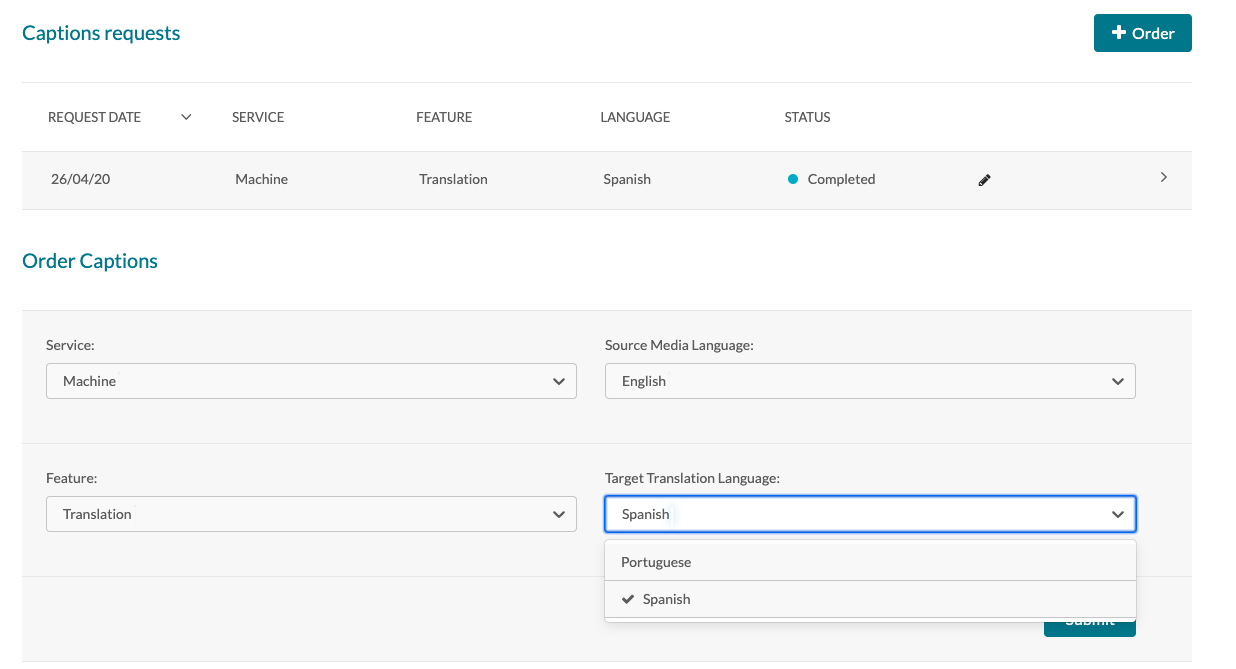
- Amberscript Price Change - Partial prices were decreased and there are new options for 24 hours and 48 hours.
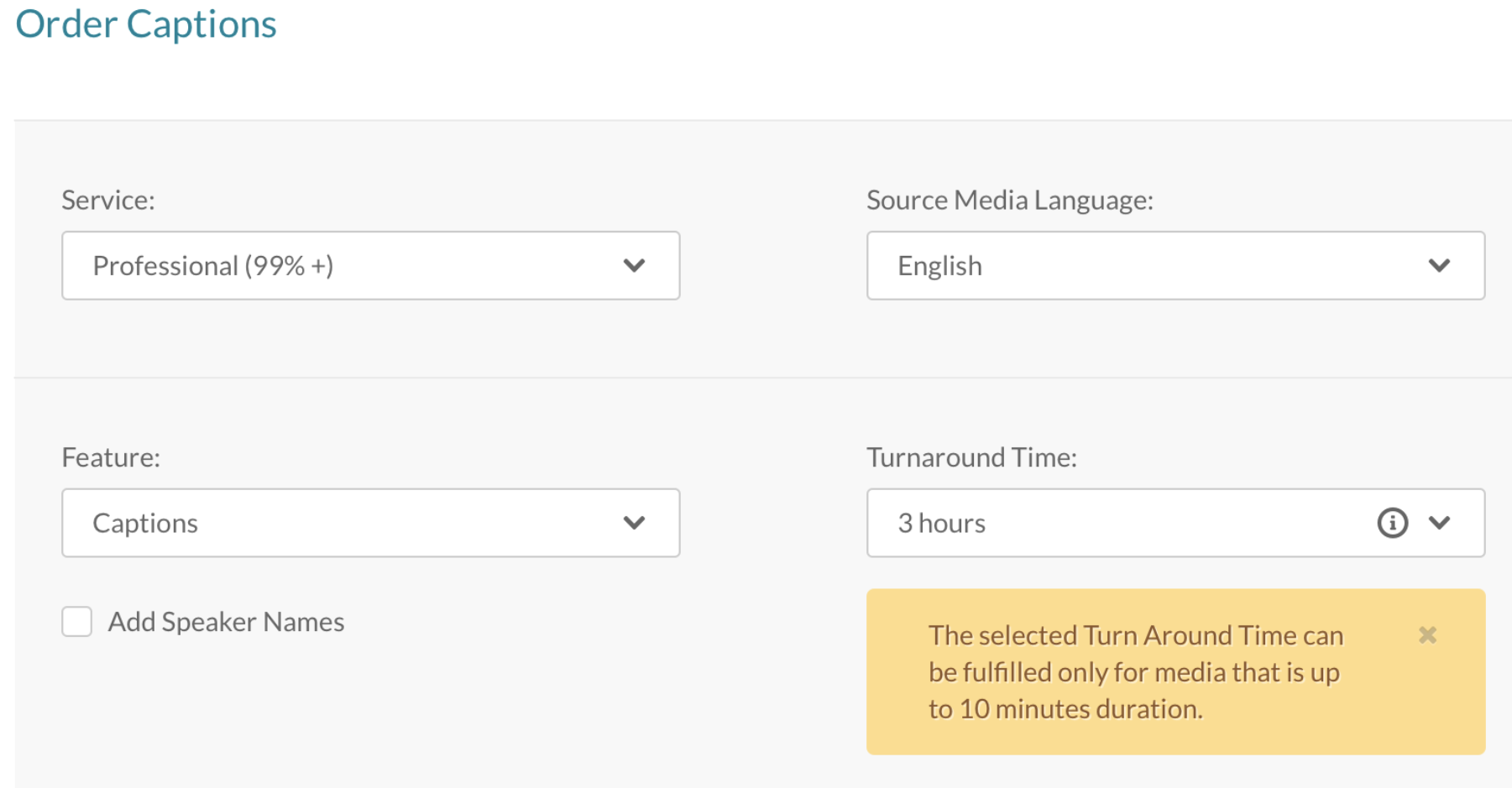
- KMS Captions Alert - If a 3 hour Turn around Time is selected for captions and if the video is more than 10 minutes an alert is displayed that it will take more than 3 hours to process.
- KMS Captioning Accuracy - It is possible to control the accuracy of uploaded captions.
- The default accuracy for a manual caption upload is 100%.
- For entries that have multiple captions for the same language, the captions that will be displayed on the player will be the captions with the highest accuracy.
Resolved Issues
| ID | Description |
Known Issues
| ID | Description |
Limitations
KMS Version: 5.98
Rich Media CMS Version: 5.24.0
Date Released: Feb 28, 2020
Overview
These release notes pertain to the Kaltura REACH v2.0 on Rich Media CMS, released February 28, 2020.
Version Rich Media CMS 5.24.0
What's New in This Release
Captioning Accuracy - It is possible to control the accuracy of uploaded captions.
- The default accuracy for a manual caption upload is 100%.
- For entries that have multiple captions for the same language, the captions that will be displayed on the player will be the captions with the highest accuracy.
KMS Version: 5.96
Rich Media CMS Version: 5.23.0
Date Released: Feb 16, 2020
Overview
These release notes pertain to the Kaltura REACH v2.0 on Rich Media CMS, released February 16, 2020.
Version Rich Media CMS 5.23.0
What's New in This Release
Now available in Rich Media CMS
Presenting REACH Profiles and Profile's Information - provides a review of the account's REACH profiles and the ability to edit the profile's different parameters.
Presenting REACH Services - Now available in Rich Media CMS, provides a review the account's REACH services.
Known Issue - Currently only Captions and Translations services are presented, additional services will be added soon.
To access the REACH Profiles and Services Page: Login to the Rich Media CMS. Go to the Settings tab and select the REACH tab.
KMS Version: 5.96
Rich Media CMS Version: 5.21.0
Date Released: Jan 12, 2020
Overview
These release notes pertain to REACH v2.0 released Jan 12, 2020.
What's New
We continue to improve our services by bringing the best of breed vendors to REACH 2.0, our Captions and Enrichment Service suite.
- Premium ASR: You can now enjoy premium ASR, Human caption and translation for Scandinavian languages, provided by our new REACH 2.0 vendor AmberScript.
The following languages are supported: Swedish, Norwegian, Danish, Finnish, Dutch, Flemish, German, French, Spanish, Italian, Portuguese.
Known Limitations- SRT only (no DFXP support)
- Metadata extraction is not supported – adding keywords as tags
- Json and txt files - currently not supported, will be added in the near future
- Audio tags and speaker change indication - not supported
- Automatic Ordering Rules
REACH 2.0 now supports creating automatic ordering rules by Privacy Context. The rule is configured on the account level and may be applied to all content with a specific privacy context or to all content excluding a specific privacy context.
KMS Version: 5.91
Rich Media CMS Version: 5.18.0
Date Released: Nov 5, 2019
Overview
These release notes pertain to REACH v2.0 released Nov 5, 2019.
New Services Version
We continue to bring top technologies to REACH2.0, our Captions and Enrichment Service suite. This version introduces the following two services:
Audio Description
Audio Description is a professional service that improves accessibility for the blind, or for people who are visually impaired.
The Audio Description service adds an audio track to a video, that combines the original audio and spoken narration of the video visual element, such as actions, written text, scenes, etc.
The service is supported for English only.
Chaptering
Chaptering is a professional AI based video service. Chaptering creates chapters automatically for a video. The chapters are reviewed by professionals and added as a content metadata, just like creating manual chapters.
Chaptering improves the user experience as it provides a more personal and customized way of viewing a video. Automatic chaptering also improves search and discoverability of content by adding metadata.
This service is supported for English only.
KMS Version: 5.91
Rich Media CMS Version: 5.18.0
Date Released: Oct 27, 2019
Overview
These release notes pertain to REACH v2.0, released Oct 27, 2019.
Version Rich Media CMS 5.18.0
- Captions' Display - Now available on Rich Media CMS, the option to hide/show captions while playing the video. By using the "Display On Player" toggle button per captions (go to entry page -> captions tab).
KMS Version: 5.88
Rich Media CMS Version: 5.12.0
Date Released: July 22, 2019
Overview
These release notes pertain to REACH v2.0 released July 22, 2019.
Version KMS 5.88 Rich Media CMS 5.12.0
- Bug Fixing
Resolved Issues
ID# | Summary |
| SUP-18484 | Caption Editor is now supported in IE |
| SUP-18599 | Caption Editor - the preview player now display captions line breaks |
| SUP-17997 | Caption Editor - When session is expired, a relevant message will be displayed to the user. Session time was extended. |
Caption Editor - Editing Reach V1 DFXP captions is working properly, line breaks and commas are respected. |
KMS Version: 5.87
Rich Media CMS Version: 5.11.0
Date Released: June 24, 2019
Overview
Version KMS 5.87
These release notes pertain to the Kaltura REACH v2, released on June 24, 2019 for KMS Version 5.87
What's New in This Release
Department Level Billing and Moderation- manage multiple budgets on the same account, enable moderation per department, present per department usage report, support different permissions per department. For more information see REACH V2 -Department Level Billing and Moderation
Usage report -The following fields are now available in the CSV report (sent by Email, from the Services Dashboard)
- Media Name
- Media Duration
- Reach Profile Name
- Automatic rules- Support for automatic ordering by tags.
- New Service - Alignment. This service provides a captions file based on a transcript (txt) file uploaded by the user. For more information see theRich Media CMS article for REACH v2, or theKMS/KAF article for REACH v2.
Known Limitations
- Deprtment level permissions - THe "Notified Users" parameter cannot be specified per profile.
Resolved Issues
ID# | Summary |
| SUP-18157 | Mandarine Chinese, Catonese Chinese, British English captions are now displayed properly. |
| SUP-18216 | Media name and duration were added to the Reach CSV report, |
KMS Version: 5.85
Rich Media CMS Version: 5.8.0
Date Released: May 5, 2019
Overview
Version KMS 5.85 Rich Media CMS 5.8.0
These release notes pertain to the Kaltura REACH v2, released on April 28, 2019 for KMS Version 5.85 and Rich Media CMS Version 5.8.0.
What's New in This Release
Ordering Captions for YouTube entries - Now available via KMS as well.
Caption Editor
- Delete a specific caption line
- Add anew caption line
- Character count per caption line
- Character limit per caption line on editing. The character limit is by configuration (set in KMS Admin, Captions module)
- Replacefound text withemptytextvalue
- Transcript Widget
- Syncronization between player captions and the Transript Widget active captions. The Transcript Widget captions are replaced once the user chooses different captions.
Resolved Issues
ID# | Summary |
| SUP-17474 | The Add Speaker box is displayed properly, also when the caption's name is very long. |
| SUP-17509 | Transcript Widget on Canvas - the Hide/Show transcript style of the display was improved. The transcript widget appears as hidden when the transcript.collapsed=true. |
| SUP-17920 | The request's status colors were corrected ["completed" status is now in blue color, "processing" is yellow, "pending approval" is grey]. |
KMS Version: 5.83
Rich Media CMS Version: 5.6.4
Date Released: March 3, 2019
Overview
Version KMS 5.83 Rich Media CMS 5.6.4
These release notes pertain to the Kaltura REACH v2, released on March 3, 2019 for KMS Version 5.83 and Rich Media CMS Version 5.6.4.
What's New in This Release
- Ordering Captions for YouTube entries - Now available via the Rich Media CMS only.
- Transcript Widget on embedded items in LMS - The transcript widget size is now auto resized according to the allowed sizes in the different LMSs.
- Ordering captions for "Draft Entries" as part of automatic ordering rules - From this release and forward, automatic captions' rules are also applied on draft entries. After a draft entry is created, a caption request is created with the status "Draft". The caption request will be updated and sent after the media is uploaded to the draft entry.
Resolved Issues
ID# | Summary |
KMS-19191 | The Transcript Widget on embed pages is now placed below the player, and not above the player. |
KMS Version: 5.82
Rich Media CMS Version: 5.2.0
Date Released: February 3, 2019
Version KMS 5.82
These release notes pertain to the Kaltura REACH v2, released on February 3, 2019 for KMS Version 5.82.
What's New in This Release
- Additional Appended Files - In addition to the captions, .txt and .json files will be added to the content related files. The files are available for download from the Rich Media CMS and KMS.
KMS Version: 5.80
Rich Media CMS Version: 5.2.0
Date Released: December 16, 2018
Overview
Version KMS 5.80
These release notes pertain to the Kaltura REACH v2, released on December 16, 2018 for KMS Version 5.80.
What's New in This Release
- Unified Caption Editor - The Kaltura Caption Editor is now available for all media's captions. You can open the editor from Media edit page, Captions tab. (1)
- Unified Transcript Widget with default display mode - A configuration was added to the Transcript Widget, that allows showing the transcript in the widget by default, or hiding it. (2)
Resolved Issues
ID# | Summary |
REACH2-78 | The Transcript Widget no longer overlaps the player. |
REACH2-479 | Editor - The video preview has been fixed and is not missing when content access control requires a KS. |
References
KMS Version: 5.79
Rich Media CMS Version: 5.2.0
Date Released: November 18, 2018
These release notes pertain to the Kaltura REACH v2, released on November 19, 2018 for KMS Version 5.79 and Rich Media CMS Version 5.2.0.
What's New in This Release
- New Interfaces in MediaSpace, KAF extensions, Rich Media CMS: Services Ordering, Request Moderations, Managing and monitoring
- Ordering Workflows
- Ability to review existing captions' requests per entry
- Ordering Manual Captions per entry
- Bulk Ordering - from My Media (KMS, KAF) or entries list (Rich Media CMS)
- Ability to create and manage automatic ordering rules - per channel (KMS, KAF) and category (Rich Media CMS)
- Automatic ordering rules per account
- Requests Moderation
- Enable moderation per service (Machine, Professional)
- Review requests and additional information, including request cost
- Approve/Reject requests
- Bulk approval
- Wide filtering options
- Account/profile credit presentation - used and remining credit
- Manual Workflow Notifications (Configuration)
- When a caption request was rejected by the admin
- When a caption request was approved by the admin
- When captions were completed
- When the account/profile reaches the credit limit
(75%, 90%, 100%) - Agreggated notifications per user
- Monitoring and Managing
- Managing accounts and profiles (sub accounts - per instance)
- Account/profile credit presentation - used and remining credit
- Requests statistic
- Requests detailed list, status and additional information
- Wide filtering options
- Send requests CSV
- Caption Editor
- Simplified Caption Editor
- Edit caption text
- Edit captions' timestamp
- Search and replace text
- Shortcuts are available
- Transcript Widget - (supported from player 2.7.x)
- Transcript Widget is enabled in KMS and KAF fore various players. Configure the Transcript Widget per player, in the Rich Media CMS studio.
- Unified Transcript Widget - to all captions, either generated by REACH or manually uploaded.
- Present captions in the Transcript Widget, following the video
- Search within the transcript
- Download transcript
- Print transcript
- Entitlement Management
- Maintain permissions for the different actions (ordering, request approvals, editing, etc.)
- Enable permissions according to roles or for specific users
- Manage trusted users - those users' requests will not require admin approvals
- Enable specific services per instance
- Captions' Display
- Display captions on player - configuration on the account/profile level, per service (Machine or Professional) - whether to display the captions while playing the video or not (supported from player 2.7.x)
- Per entry - the ability to hide/show captions while playing the video
- Metadata Extraction - (Configuration) key words will be added as tags as part of the captioning process.
- Security, Detection Policy (Configuration) - content (video + captions) will be deleted from the captions vendor servers according to the deletion policy. The options are: after captions are completed, after a week, after a month, or not deleted at all.
- Glossary (Configuration) - the ability to add glossary on the account level to be considered while captioning.
- Reports - request usage and billing reports by API.
Known Limitations
- Reach v2 is fully supported in MediaSpace V2 UI. MediaSpace v1 UI supports Reach with UI limitations on the services dashboard.
- Caption Editor
- Shortcuts do not work on IE
- Caption Editor - supported only on app with minimum width of 940px
- Creating ordering rules per channels in KAF - no specific permissions apply on rules. (There is no filter on the content creator role, any content published in the channel will be captioned.)
