About
The Assets tab in the edit media page lets you manage the files associated with your media entry. From here, you can replace the main media file, add downloadable attachments, and control which files viewers can download.
This helps you keep your content up to date, provide supporting materials, and control access to downloadable versions.
- This feature requires the Theming module to be enabled with the 'mediaedit' feature set to 'yes'.
- The Assets tab appears only if the relevant modules are enabled for your account. Within the tab, options such as Replace media, Attachments, and Downloads appear only if their corresponding modules are enabled.
Who can use this
- Media owners
- Co-editors
Access the Assets tab
- From the user menu, select My Media.
- Click the three dots to the right of the desired media and select Edit.
- In the left navigation, click the Assets tab to display the Assets edit page.

The 'My Media' page displays.

Alternatively, you can access the edit page from the media page by clicking the three-dot menu and selecting Edit.

The edit page opens on the Details tab by default, with a left-hand navigation.

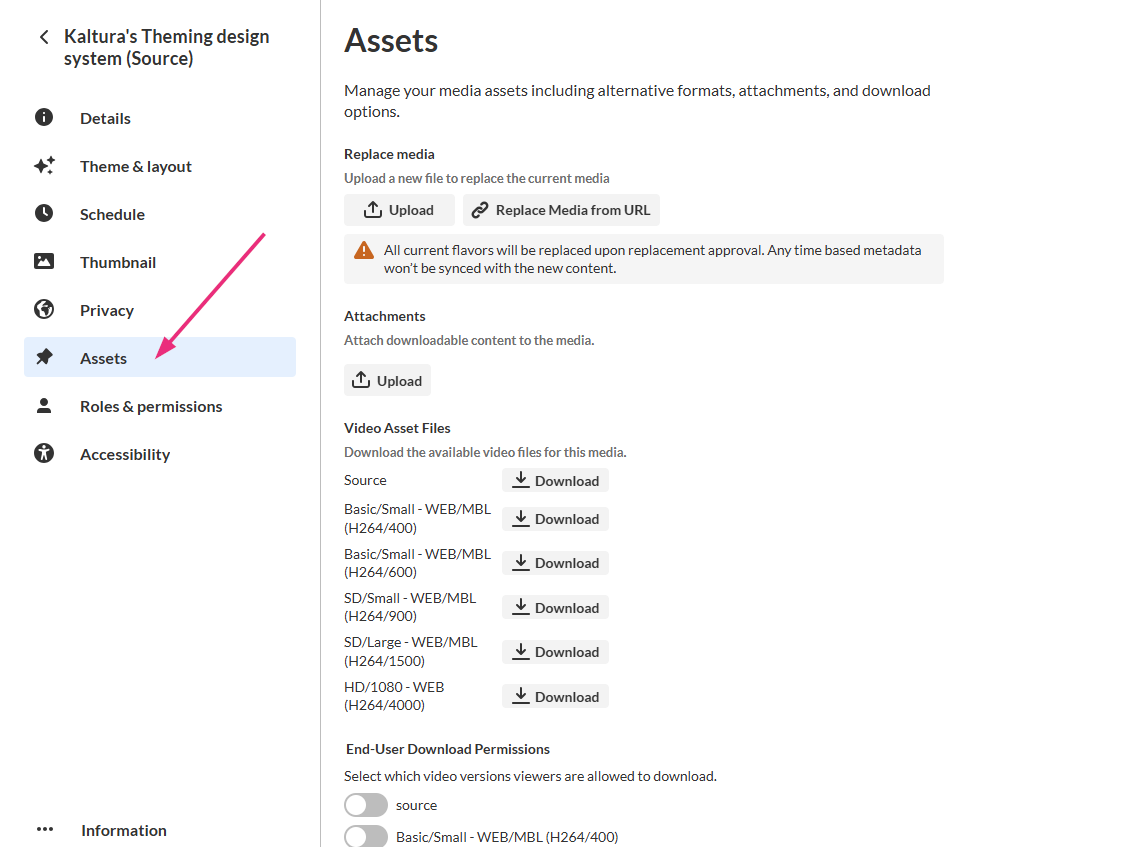
All edit actions apply immediately. There is no Save button on this page.
Replace the main media file
Use this section to upload a new version of your media while keeping the same entry, link, and analytics.
This feature requires the Replacemedia module to be enabled.
Manage attachments
Use the Attachments section to add downloadable files (for example, PDFs, slides, or additional media) to your entry.
This feature requires the Attachments module to be enabled.
Attachments aren't supported for Interactive Video entries.
View available media files
The Video Asset Files section lists all available versions of your media (for example, source, HD, or lower-resolution formats). The list reflects the versions generated during upload and processing.
Each file appears with a Download button, allowing media owners and co-editors to download files directly.
Control download options
The End-User Download Permissions section lets you control which media files viewers can download.
Use the toggle switches next to each format to allow or prevent viewer downloads.
This feature requires the Downloadmedia module to be enabled.
