About
The Conditional Display Text module is designed to display a notification on the Entry page and the Edit entry page whenever an entry has been downgraded due to pruning by the media repurposing process. The sections herein will guide you through enabling and configuring the Conditional Display Text module.
This module is for both Content Hubs and legacy Video Portal users.
For technical support, contact Kaltura Customer Care. For all other inquiries, reach out to your Customer Success Manager.
Prerequisite
This module relies on custom entry metadata configured within the Rich Media Content Management System (CMS). Before configuring the module, you must create a custom metadata profile that contains the relevant condition. This can be done in CMS > Settings > Custom Data.
Configure
1. Access your Configuration Management console.
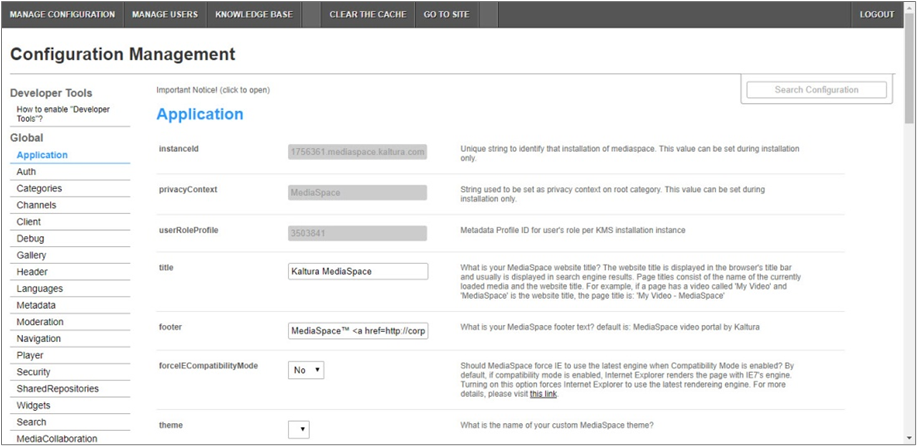
4. In the list of configurable items on the left of your screen, locate and click on Conditionaldisplaytext.
The Conditionaldisplaytext item will be crossed out because it is disabled by default.
The Conditionaldisplaytext window displays.

The Module Info box displays the module name, description (what enabling this module allows users to do), and version number.
5. In the enabled pull-down list, select Yes to enable the Conditionaldisplaytext module.
Other configurable items following the enabled pull-down list are as follows.
| Configuration Name | Options | Description |
| labelText | Free text | Enter the message that will display if the metadata field is true. |
| profileId | Choose from list of custom metadata profile IDs | What is the ID of the custom metadata containing the condition? Copy the custom data schema ID from KMC > Settings > Custom Data. |
| requiredFields | Choose from list of custom data fields | Which custom data field defines if the message should display? Use custom data system names from KMC > Settings > Custom Data. |
6. Click Save. You receive a notice that your configuration for Conditionaldisplaytext was saved and the cache was cleared.
Conditional Display Text
Once enabled and configured, if an entry includes the defined metadata and meets the condition, the configured message will appear on the entry page and the edit entry page for the relevant entry.
Content Hubs users:
Entry page -

Edit entry page -

Legacy Video Portal users:
Entry page -

Edit entry page -

This document is maintained by Kaltura’s Professional Services team. Please send comments or corrections to your Customer Success Manager. Ask them to forward it to the Professional Services team. We are committed to improving our documentation and your feedback is appreciated.
