About
The alignment service (ordering captions based on a transcript file) synchronizes a provided transcript (.txt) with the audio or video content. This is useful for scripted videos, such as training content, where the speaker reads from prepared text.
Upload a transcript as a .txt file, and the system matches the text to the timing of the spoken words in the video. When the speaker closely follows the script, the result is highly accurate captions.
These instructions are for Theming users. If you don't have Theming enabled on your account, please see our article Order alignment.
Access the Captions & enrich service
- From the Video Portal user menu, select My Media.
- Click the thumbnail of the desired video.
- Click the three dots at the lower-right of the player to open the menu.
- Select Reach captions & Enrich from the menu.

The My Media page displays.


The media page opens.


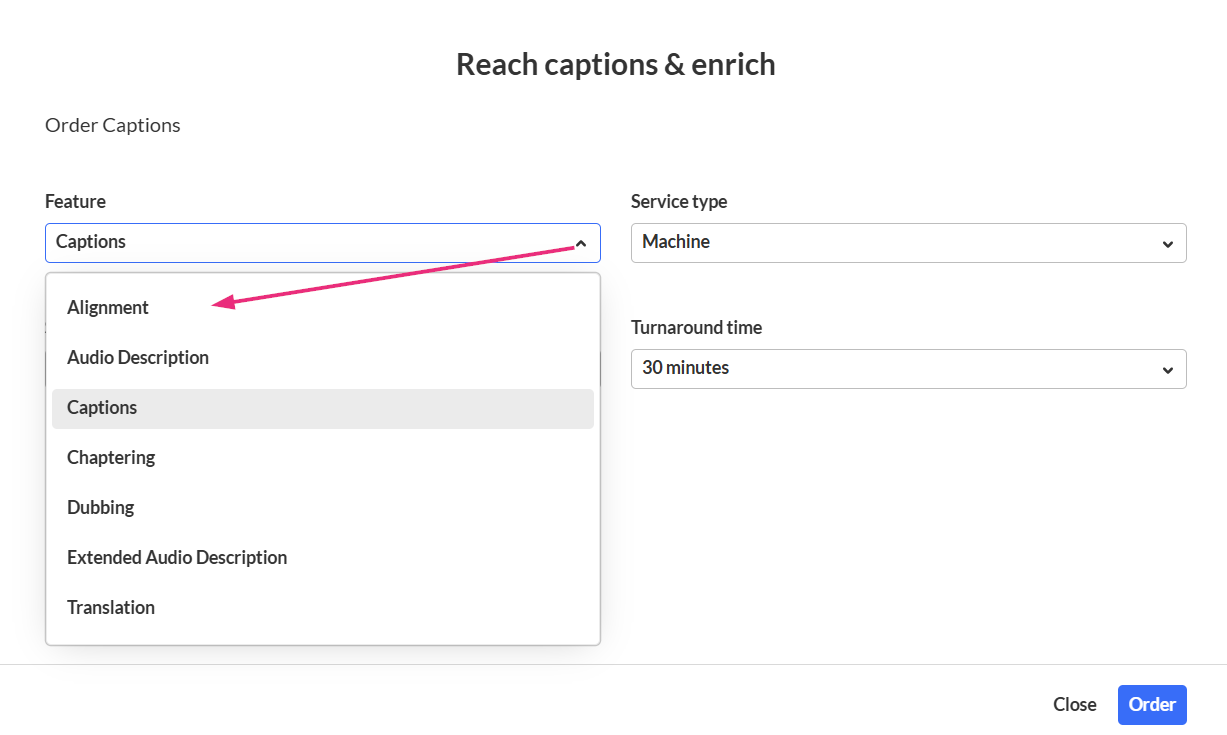
The 'Reach captions & enrich' page displays.

Order alignment
- In the 'Reach captions & enrich' page, complete the fields as follows:
- Feature - Select Alignment.
- Service type - Select Machine.
- Source Media Language - Select the language from the drop-down menu.
- Choose a txt file from the list of existing files (only one file can be selected) or click Upload txt to upload a new file.
- Upload your file and complete the Title field.
- Click Save.

The Upload Attachment window displays.

Your request is generated, and a success message displays. The system aligns the transcript with the video and generates a caption file (SRT or DFXP).
