About
Use the External CSS setting to apply custom CSS styling to a player.
This setting is available for video, audio, and reels players.
Access the Visual settings
- Log into your Rich Media CMS and click the Studio tab.
- From the list, select the player you want to configure.
- Click the stars icon.


The settings tab opens.


The visual settings display.
Apply custom CSS
1. Select the External CSS checkbox.
2. In the CSS url field, enter the URL of the CSS file.

3. Click Save at the top right of the settings page.
The player loads and applies the styles from the specified location.
Example
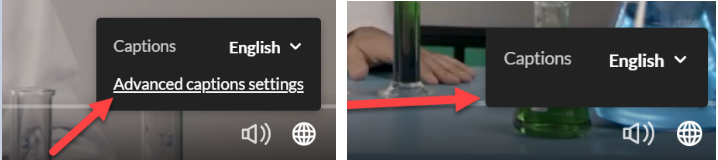
The following CSS code hides the Advance captions settings from the player.
 a.playkit-advanced-captions-menu-link {
display: none;}